OpenAI Data Agent Explained: How ChatGPT Work Turns Company Data into Dashboards
OpenAI’s Data agent connects approved business data to natural-language analysis, evidence and interactive dashboards. This guide explains the architecture, permissions, semantic context, risks and implementation checklist.
OpenAI’s Data agent in ChatGPT Work is aimed at a common enterprise problem: people have business questions, but answers are trapped behind reports, SQL queues, dashboard specialists and inconsistent definitions. The Data agent lets users ask questions in natural language, investigate changes in approved company data and build interactive dashboards. The interesting engineering issue is not whether an AI can draw a chart. It is whether the answer preserves permissions, metric definitions, source lineage, uncertainty and a reviewable path from question to evidence.
What the Data agent does
Natural-language analysis connected to approved enterprise data and business context.
OpenAI describes the Data agent as a ChatGPT Work experience that can connect to approved data sources, investigate what changed and build interactive dashboards. Users can ask questions such as why sales changed, where spending is rising or which issues threaten renewals, then refine the analysis in the same conversation.
The announcement lists connections including Amazon Redshift, Datadog, Google BigQuery, ClickHouse, Databricks, MongoDB and Snowflake, along with files and documents from Google Drive and SharePoint. It also describes connections to business-intelligence tools such as Tableau, Power BI, Sigma and ThoughtSpot. Availability and connectors can vary by account and workspace, so an organization should verify the current product configuration before planning a rollout.
The agent can investigate, create visualizations, share dashboards and recommend next steps. OpenAI also says approved actions through connected tools can be carried out after the user approves them. That last boundary matters: analysis, recommendation and action are different authority levels.
This is an enterprise-data extension of the same ownership principle in our Agents API architecture guide: the model can coordinate work, but the application and workspace still own identity, access, tools, effects and recovery.
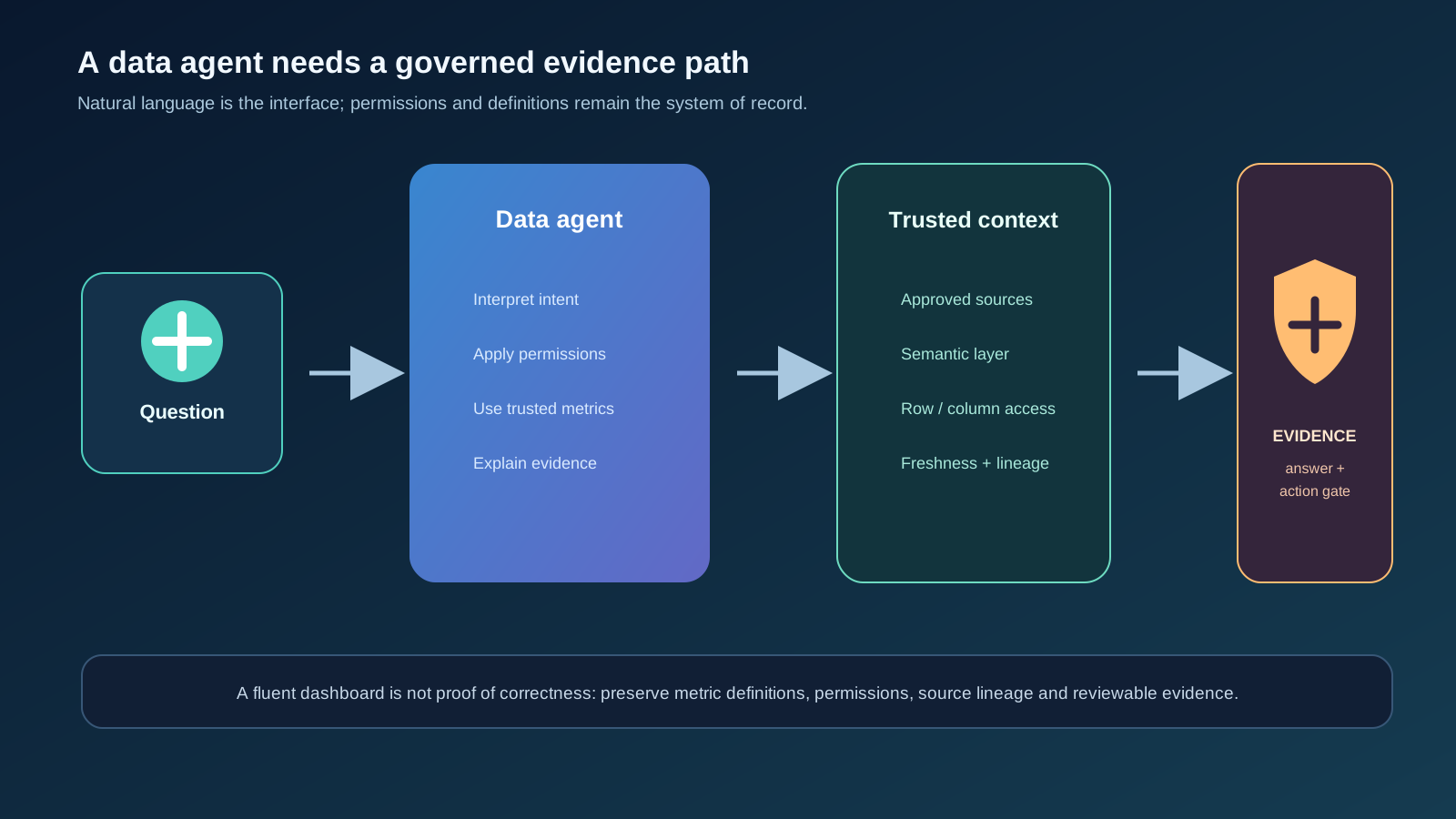
| Stage | Agent responsibility | Control to preserve |
|---|---|---|
| Ask | Interpret the business question and clarify ambiguity | User, workspace and purpose context |
| Retrieve | Select approved sources and relevant records | Connector, row and column permissions |
| Analyze | Compare periods, drivers and relationships | Metric definitions, freshness and calculation lineage |
| Explain | Show evidence, caveats and likely drivers | Citations, source references and uncertainty |
| Act | Recommend or perform an approved next step | Explicit confirmation and separate action authorization |
The semantic layer is the difference between fluent and useful
A model can calculate a number correctly from the wrong definition.
Business questions often sound simple but contain hidden definitions. “Why did revenue fall?” might mean booked revenue, recognized revenue, gross sales, net sales, a regional subset, a product cohort or a currency-normalized period. “Active customer” can also mean several different things depending on the team and reporting system.
OpenAI says the Data agent can use business terms, metric definitions, custom calculations and data relationships from semantic layers and trusted sources. This is the right direction: the agent should not invent a definition every time it sees a familiar phrase. The organization needs to own the glossary, relationships, filters, exclusions and calculation versions that make an answer meaningful.
Semantic context does not eliminate errors. A definition can be outdated, a source can be incomplete, a join can multiply rows, or a dashboard can mix data with different refresh times. The agent should show which definition it used and allow a reviewer to inspect the underlying evidence before treating the result as a decision.
The same evidence principle appears in our LLM evaluation pipeline guide: an output is only useful when the test case, expected meaning and supporting evidence are explicit.
- Maintain a versioned business glossary.
- Define metric owners and review dates.
- Expose filters, joins and exclusions used in each answer.
- Mark stale, partial or estimated data visibly.
- Separate descriptive facts from model-generated hypotheses.
- Keep a path from chart to source rows or source reports.
Permissions must survive the conversational interface
A friendly question should not bypass table, row or column controls.
OpenAI says enterprise administrators choose which data connections are available and which roles can use them, while queries enforce connected-account permissions including table, row and column restrictions. That is a critical foundation. A natural-language interface should make approved access easier to use, not turn it into a new route around existing governance.
Permission testing should cover indirect questions too. A user who cannot see individual salaries may still ask for a chart that reveals the same information through small groups, outliers or repeated comparisons. A user may also combine several permitted queries to infer a restricted fact. Data-agent governance therefore needs aggregation thresholds, sensitive-field classification, query history and monitoring for repeated probing.
The agent should distinguish “no access” from “no data” without leaking the restricted record. Error messages, suggested follow-up questions, chart labels and generated summaries can all become side channels. Test the complete user-visible response, not only the SQL or API request generated behind it.
This is closely related to the discovery-versus-execution boundary in our MCP gateway article: seeing a capability or metadata does not automatically grant permission to use sensitive data.
| Failure mode | Example | Mitigation |
|---|---|---|
| Direct exposure | A user sees a restricted row or column | Connector-enforced authorization and negative tests |
| Aggregation leak | A small group reveals one person’s value | Minimum group size and sensitive metric rules |
| Inference leak | Repeated comparisons reveal a hidden trend | Query monitoring, rate limits and review |
| Context leak | The model mentions restricted names in an explanation | Response filtering and field-level redaction |
| Action escalation | An analysis assistant sends data or triggers a workflow | Separate approval and action identity |
Evidence, citations and uncertainty make dashboards safer
A polished visualization can create more confidence than the underlying analysis deserves.
The Data agent is designed to produce interactive dashboards and explain findings. That can shorten the distance from raw data to decision, but it also creates a presentation risk: a clean chart may hide missing data, selection bias, a changed definition or an unsupported causal story.
Require every important finding to carry evidence metadata. The output should state the time range, filters, source tables or reports, refresh time, calculation definition and material exclusions. If the agent is suggesting a possible driver rather than proving causation, use language that preserves that distinction.
Reviewers should be able to challenge the analysis in the same interface: change the period, remove a filter, compare another cohort, inspect source records and ask what evidence would disprove the explanation. The goal is not to make every user a data engineer; it is to make important conclusions inspectable by someone responsible for the decision.
For a related pattern of broad exploration followed by evidence checks, see our PageBreak analysis. The domain is different, but the principle is the same: a plausible output is not yet a verified result.
Common Mistakes
- Treating correlation as a causal explanation.
- Sharing a dashboard without its filters and data freshness.
- Accepting a generated KPI definition because the chart looks polished.
- Removing caveats to make an executive readout shorter.
- Using an estimated or partial dataset without labeling it.
Analysis and action need separate approval paths
A data agent can recommend a next step without being allowed to perform it automatically.
OpenAI describes the Data agent as able to recommend next steps and, through connected tools, carry out actions users approve. This separation should be preserved in every implementation. Reading sales data, drafting a forecast, sharing a dashboard, sending an email and changing a customer record are not the same risk category.
Use a staged workflow. First return an analysis with evidence. Then present a proposed action with target, scope, audience, data and expected effect. Ask for approval from a principal authorized for that action. Finally, execute through a separate tool identity that rechecks policy and records the effect. Do not treat the user’s original natural-language question as standing approval for all downstream actions.
This is especially important when the agent can share findings through email, Slack or a BI tool. The recipient list, data classification and message content should be visible before sending. A dashboard that was safe for one team may become sensitive when shared across a wider group.
Our human-in-the-loop automation guide provides a practical approval model for keeping analysis fast while placing explicit gates before consequential effects.
- Keep read, explain, share and mutate permissions separate.
- Show the exact proposed action before approval.
- Recheck authorization at execution time.
- Log approver, target, data scope, tool identity and outcome.
- Make external sharing and irreversible changes non-default.
A practical rollout plan for teams
Start with a narrow, reversible analysis workflow and expand only with evidence.
Begin with one department, a small set of approved sources and read-only questions. Choose use cases where the value is easy to measure and the consequences of a wrong answer are limited, such as investigating a product funnel, preparing an internal operations dashboard or explaining a support-volume change.
Before launch, create a test set of real-shaped questions with expected definitions, access outcomes and evidence requirements. Include questions from different roles, ambiguous wording, restricted fields, stale data and adversarial attempts to infer sensitive information. Compare the agent’s answers with reviewed analyst results without pretending that one test set is a universal benchmark.
After launch, monitor factual corrections, permission denials, unsupported causal claims, data freshness failures, dashboard shares, action approvals and user feedback. Review the metric glossary and connector permissions regularly. Expansion should follow demonstrated reliability and governance, not only usage volume.
This staged authority model also matches our Astra security analysis: powerful capability should lead to more precise boundaries and monitoring, not automatic access to more systems.
data_agent_evidence.json{
"question": "Why did weekly activation change?",
"metric_definition": "activation-v3",
"sources": ["warehouse.events", "product.accounts"],
"filters": ["region=all", "week=2026-09-21"],
"freshness": "2026-09-27T08:00:00Z",
"finding_type": "descriptive",
"action_authorized": false
}Tips
- Prefer read-only and reversible use cases first.
- Create reviewed question sets before broad rollout.
- Track definitions and connector permissions as versioned configuration.
- Expose source and freshness metadata in shared dashboards.
- Review both successful answers and refused or corrected answers.
What the Data agent does not prove
A natural-language dashboard does not prove that the underlying data is complete, that the metric definition is correct, or that the proposed explanation is causal. A connector that respects permissions does not remove the need to classify sensitive outputs and monitor inference risks.
It also does not eliminate analysts, data owners or business accountability. The agent can lower the cost of asking questions and preparing views, but teams still need owners for definitions, data quality, access policy, model behavior and decisions made from the result.
The durable takeaway is that enterprise data agents should be built as evidence systems, not answer generators. Give users a faster path to trusted context while keeping permissions, definitions, lineage, uncertainty and action approval visible at every step.
FAQ
What is OpenAI’s Data agent?
It is a ChatGPT Work experience that can connect to approved business data, investigate questions, explain findings and build interactive dashboards using organizational context and permissions.
Can the Data agent access every company database?
No. Administrators choose available connections and roles, and the connected account’s permissions are intended to remain enforced. Organizations should verify configuration and test for direct and inference leaks.
Can it create dashboards automatically?
OpenAI says the Data agent can build interactive dashboards and visualizations from an analysis. The result still needs review of definitions, filters, freshness, evidence and sharing permissions.
Can the Data agent take actions?
OpenAI describes recommending next steps and carrying out approved actions through connected tools. Analysis, recommendation and execution should remain separate permission levels.
What is the safest first use case?
Start with read-only, reversible internal analysis using a small set of governed sources, such as explaining a product or operations metric with visible definitions and source evidence.
Sources
Primary and authoritative sources reviewed for this article.
- OpenAI: Now everyone can put data to work
Official announcement covering Data agent capabilities, approved data sources, semantic context, permissions, dashboards, connected actions and rollout.
- OpenAI: Introducing the Agents API
Official context for long-running agent environments, tools, sessions and application ownership boundaries referenced in the analysis.
Conclusion
OpenAI’s Data agent could make business analysis more accessible, but the value will depend less on fluent charts than on governed context. Trusted definitions, current data, enforced permissions, source lineage, uncertainty and explicit action approvals are what turn a conversational answer into a responsible decision aid. Teams should roll it out as an evidence and access project—not simply as a new chatbot interface for the warehouse.