WebMCP Explained: How AI Agents Can Use Websites Through Structured Tools
WebMCP lets websites expose structured browser-side tools to AI agents. Learn how its APIs work, how it differs from MCP, and the security and rollout decisions developers should make.
An AI agent can often reach a website today, but it has to infer what a button means, locate the right fields, and hope that a changing layout does not break its next click. WebMCP proposes a different contract: a website can expose a small set of structured tools from its live browser page, so a compatible agent can discover an action and call it with typed arguments instead of guessing from pixels. That idea is timely because browsers are adding agent-facing capabilities, but it is also easy to overstate. As of September 30, 2026, Chrome's WebMCP material describes an experimental proposal and an origin-trial path, not a universal browser feature or a replacement for server APIs. This analysis explains the browser-side architecture, where MCP still fits, and the security and testing work that remains the website owner's responsibility.
What WebMCP is, and why it has developer attention
It gives a live website a structured way to describe selected actions to an agent in the browser.
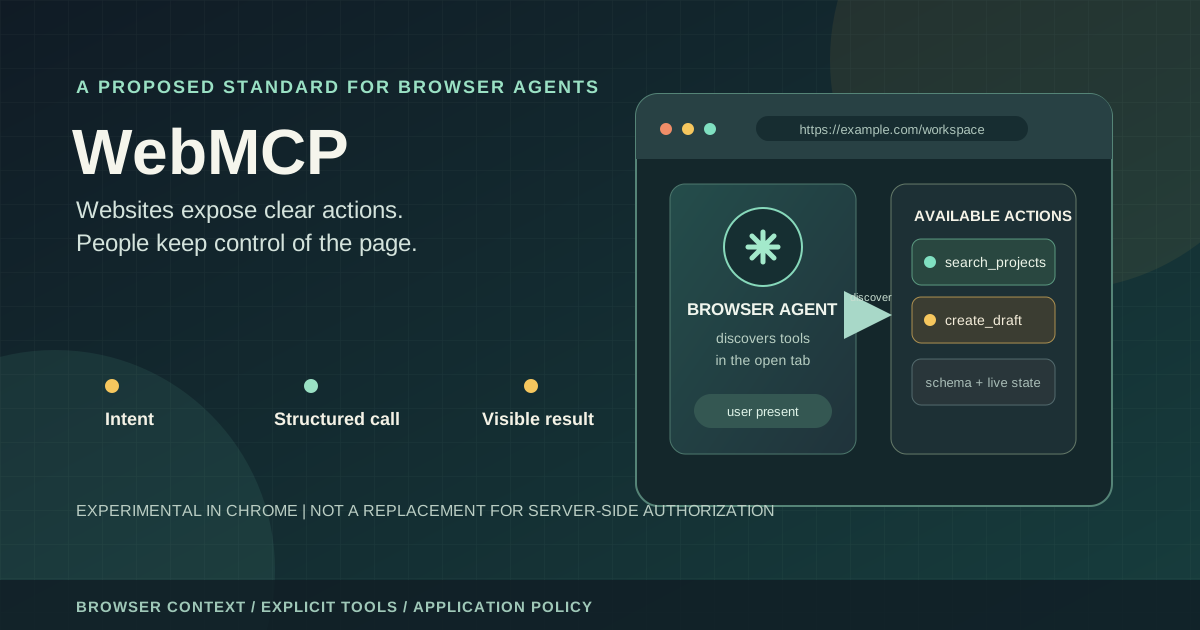
WebMCP is a proposed web standard from the Web Machine Learning Community Group. In practical terms, a site can describe a tool with a name, a plain-language description, and a JSON Schema input contract. A compatible browser agent can discover those tools in the currently open page and request that one run. The page's JavaScript or a form then connects that request to the application's existing behavior. The goal is to reduce the gap between a human-oriented interface and an agent that needs precise, machine-readable actions.
Google Chrome's developer team made WebMCP available for early preview in February 2026. Its documentation has since grown to cover the declarative and imperative APIs, security, best practices, and evaluations. The official documentation currently points developers to a Chrome origin trial and labels the technology experimental. Those are confirmed signals of active implementation work, not evidence of broad browser interoperability, production readiness, or a settled standard. The distinction matters to anyone deciding whether to invest in a prototype or promise support to customers.
There is a real engineering reason to pay attention even before standardization: an agent that can call a well-scoped search, filter, or draft action may need fewer fragile UI steps. The useful question is not whether structured tools are inherently better than clicking. It is whether exposing a specific action improves task success while preserving the user's context, permissions, and ability to review side effects. That is a measurable product decision, not a reason to make every website endpoint callable by a model.
| Confirmed in current primary material | Not established by that material |
|---|---|
| A browser-oriented proposal for structured tools exposed by a page | A finalized, cross-browser standard with universal agent support |
| Chrome offers an experimental origin-trial path and developer documentation | General availability or a stable compatibility promise |
| A site can connect tool calls to its client-side application logic | That an exposed tool is authorized, safe, or correct by default |
How a WebMCP call moves through a browser page
The important unit is a tool call scoped to an active tab, not a new remote API endpoint.
A normal flow starts after a user opens a website in a compatible browser. The page registers tools that make sense for its current state. A browser agent discovers the available names and schemas, maps the user's request to one of those tools, and submits structured arguments. The browser mediates the call to the page's registered handler. That handler can validate the request, call existing client-side functions or a backend service, update the interface, and return a result for the agent to explain to the user.
This model can preserve application context that is already present in the tab: the selected project, current search filters, visible checkout state, or the authenticated session. That convenience is also a trust boundary. The page is not handing authority to the model in the abstract; it is exposing an action whose callback runs in the application context. A user's existing session can carry meaningful privileges, so each handler still needs ordinary authorization checks and careful handling of mutations.
The flow visual below separates discovery, invocation, application policy, backend authorization, and the visible result. The separation is intentional: a schema helps an agent form a better request, but it does not prove the arguments are truthful, current, or permitted. The server must remain authoritative for data access and high-impact state changes.
This browser-focused path complements, rather than duplicates, the server-side adapter covered in our Google Cloud API Gateway MCP analysis. That article focuses on translating remote MCP calls to REST operations; WebMCP focuses on structured actions in a live page.
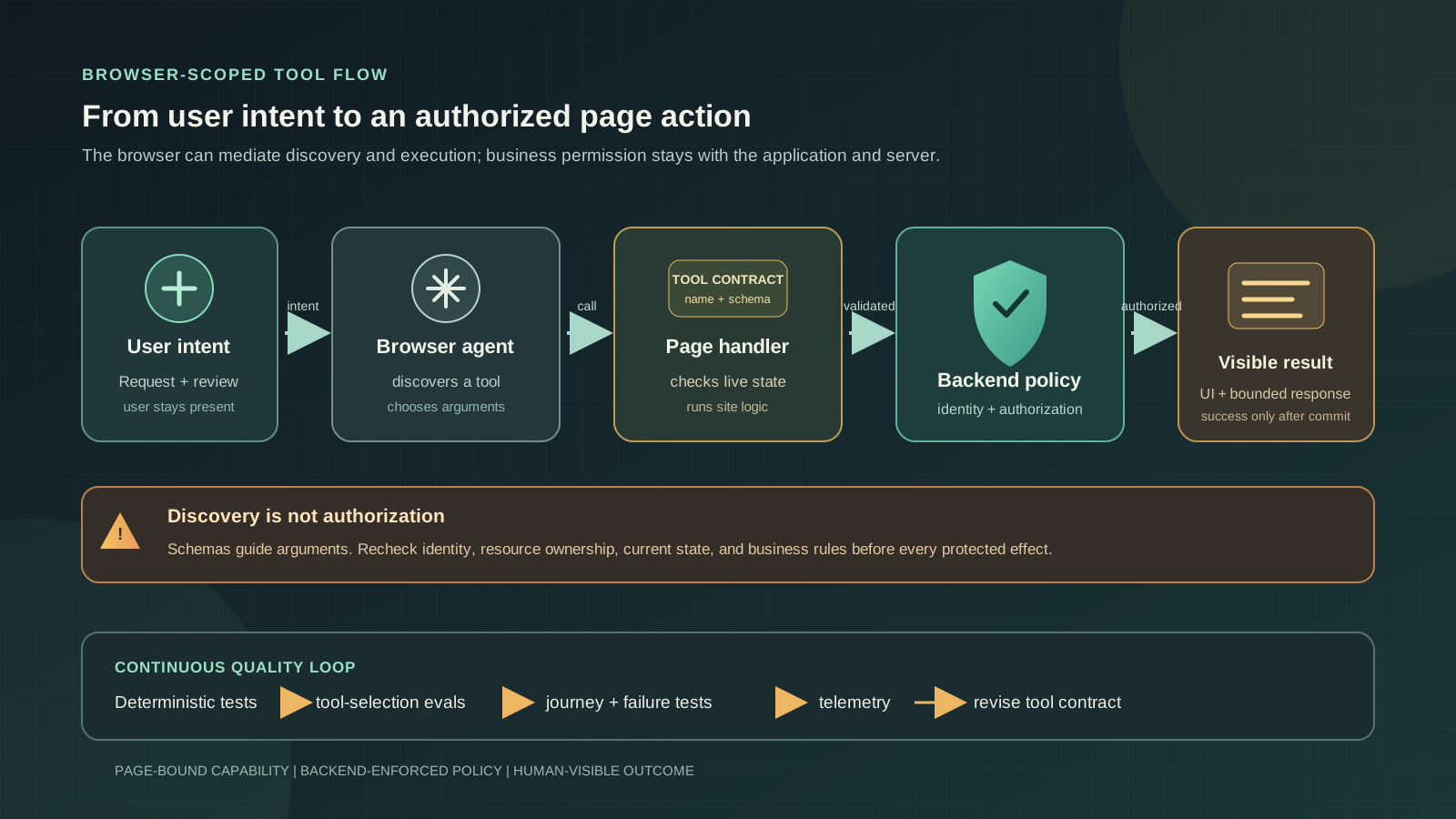
| Stage | System responsibility | Failure to guard against |
|---|---|---|
| Register and discover | The page exposes tools relevant to its current state; the agent reads their descriptions and schemas. | Stale or excessive tools that disclose unnecessary capability or confuse selection |
| Propose a call | The agent maps user intent to a tool name and candidate arguments. | Wrong tool choice, invented identifiers, or arguments inferred from untrusted page text |
| Validate and execute | The page validates current state and the backend enforces identity, authorization, and business rules. | Treating a valid schema or browser session as proof that a write is permitted |
| Update and report | The interface reflects the result and the tool returns bounded, useful output. | A stale UI, ambiguous partial failure, or an agent claiming success before commit |
Declarative forms and imperative JavaScript solve different jobs
Use the smallest interface that can express the real action, then keep its behavior aligned with the page.
Chrome documents two complementary approaches. The declarative API annotates standard HTML forms so the browser can expose familiar form interactions as tools. It is a natural starting point for a search, support request, or application form whose controls and submission behavior are already represented in HTML. Reusing a form can reduce duplicated logic, but it does not eliminate the need to validate values in the application and on the server.
The imperative API registers JavaScript-defined tools through document.modelContext.registerTool(). It is more suitable when an action depends on live application state or a workflow that cannot be expressed as a conventional form, such as selecting among currently loaded records or asking the UI to prepare a draft. The callback can reuse existing code, but that flexibility also makes it important to keep registration scoped, arguments validated, and side effects explicit.
A simplified imperative tool might look like this. It intentionally performs a bounded search and delegates the actual data boundary to an application function that must apply the signed-in user's access rules. It is illustrative rather than copy-paste production code: the API remains experimental, and exact interfaces should be checked against the current browser documentation before implementation.
register-search-tool.jsawait document.modelContext.registerTool({
name: "search-projects",
description: "Search projects visible to the signed-in user by a short query.",
inputSchema: {
type: "object",
properties: {
query: { type: "string", description: "Words to match in project names." }
},
required: ["query"]
},
async execute({ query }) {
const normalized = query.trim().slice(0, 120);
if (!normalized) return { content: [{ type: "text", text: "Enter a search term." }] };
const results = await searchVisibleProjects({ query: normalized });
return { content: [{ type: "text", text: JSON.stringify(results) }] };
}
});Tips
- Prefer a declarative form when the user action is already a standard form submission.
- Prefer an imperative tool when the action is inherently tied to live client-side state.
- Do not register a second implementation of business rules that should remain server-owned.
- Return only the information the agent needs for the next step, not an unbounded record dump.
WebMCP is not MCP with a browser-shaped URL
The two approaches have different lifetimes, trust boundaries, and deployment goals.
Model Context Protocol connects an AI client to external tools and data through server-oriented integrations. WebMCP instead proposes a browser platform interface for actions exposed by a website that the user is currently visiting. The Chrome comparison guide explicitly frames the technologies as complementary. A backend MCP service can make a capability available beyond an open tab; a WebMCP tool can help an agent interact with the live page and its present application context.
The difference affects architecture. A server-side tool is a good fit for durable workflows, scheduled tasks, cross-client access, and operations that must run when no browser is open. A page tool is more compelling when the user is co-browsing, the current UI context matters, and it is useful to update the visible interface while the action happens. Some products will want both: the backend remains the stable business capability, while a page exposes a narrower interface that calls it under the current user's authority.
A useful design test is to ask what should happen when the user closes the tab. If the operation must continue, WebMCP alone is the wrong execution foundation. If the task depends on a live selection or should be visible in the current page, a remote server tool may need extra context that the browser already has. Our
AI agent architecture comparison makes the same broader point: choose the execution boundary from task requirements rather than adopting an agent label first.
| Question | Backend MCP is usually a better fit when... | WebMCP is usually a better fit when... |
|---|---|---|
| Where should capability live? | It must be available independently of a particular page or browser tab. | It is a contextual action in the currently open website. |
| What state matters? | The service can obtain state through its API and identity model. | The user's live page state or visible UI is important. |
| Who owns continuity? | A backend worker or service can persist and resume the work. | The interaction is intentionally tied to the active browser session. |
| Can both be used? | Yes. Keep core rules in the service and expose suitable operations to compatible clients. | Yes. Provide a contextual page tool while retaining backend authorization and policy. |
Treat tool exposure as a security boundary
Discovery is not authorization, and user presence is not a substitute for server-side policy.
WebMCP makes it easier for an agent to find an action. That is a usability property, not a permission grant. The official Chrome material describes browser controls including origin isolation and a tools Permissions Policy, with access defaults and cross-origin iframe behavior that developers need to understand. These controls limit where the API can be used; they do not decide whether a particular user may refund an order, export a workspace, or change an account setting.
Treat every tool call as untrusted input even when the browser supplies a schema. A model can select the wrong tool, supply an identifier mentioned in untrusted page content, or call a valid action in an unexpected sequence. A schema can constrain shape, but it cannot establish that an order belongs to the current user, that a payment is eligible for refund, or that the user approved a destructive operation. The page handler should check current state, and the backend should independently authenticate and authorize the operation at the point of effect.
For a consequential write, split preparation from commitment. A tool can gather details or create a draft, then present a review step through the existing UI before a separate authorized commit. Use narrow capabilities, server-side tenant checks, CSRF protections appropriate to the site's architecture, idempotency keys for retryable mutations, and auditable outcomes. Never put secrets in a tool description or assume a hidden button is a security control. Human approval is valuable only when it is tied to the exact action and enforced before execution; our
human-in-the-loop automation guide explains how to keep proposal, approval, authorization, and execution as distinct records.
| Mechanism | What it can help with | What it cannot prove |
|---|---|---|
| JSON Schema input definition | Communicating expected argument names and types to the agent | That arguments are truthful, authorized, current, or safe |
| Browser origin and permissions policy | Constraining which documents can access the browser API | That a user may perform a particular business operation |
| Visible confirmation step | Giving a user a chance to review a specific consequential action | That the server will reject a forged or replayed request without its own checks |
| Backend authorization | Enforcing identity, resource ownership, and business policy at the system of record | That the agent selected the best action or explained it correctly |
- Keep sensitive authorization decisions in deterministic application and server code.
- Validate identifiers, ownership, current state, and business rules again at execution time.
- Require an explicit, visible confirmation for high-impact or irreversible changes.
- Limit tools to the active workflow and remove them when their preconditions no longer hold.
- Log the authenticated actor, requested tool, validated arguments, result, and approval evidence without logging secrets.
Design robust tools around live state and failure
An agent-facing tool is a contract that must survive ambiguity, retries, and changing application state.
Tool names and descriptions are part of the model-facing interface. Use a specific verb and outcome: search_projects is clearer than do_project_action. Keep similar tools distinct, use ordinary language for enum values, and accept user input in a form the application can validate rather than asking the model to perform fragile conversions. A small set of single-purpose tools is easier to evaluate than a broad catalog with overlapping descriptions.
Registration can depend on page state. A checkout action should not appear before a cart exists; a submit action should disappear after submission or when the user leaves the relevant flow. When tool availability changes, the agent needs an updated view of that state. Even then, the handler must re-check its preconditions at call time because the page can change between discovery and execution. A tool list is a snapshot, not a lock on the application.
Design retries intentionally. Read-only queries are usually safe to repeat, but writes need idempotency or an explicit duplicate-detection strategy. Return actionable errors such as 'The selected project is no longer available; refresh the list' rather than a raw stack trace or a vague failure. If a backend request times out after it may have committed, report an uncertain outcome and check server state before inviting another attempt. The interface should update before the agent reports completion, especially when the user and agent share the same page.
The same separation between tool proposal and execution is central to our OpenAI Agents API architecture analysis: application code remains responsible for invoking tools and enforcing the authority around them.
Tips
- Keep each tool's purpose distinct and its output bounded.
- Revalidate current identity, state, and permissions inside the execution path.
- Make writes idempotent where possible and distinguish failed from unknown outcomes.
- Synchronize the visible UI with a completed action before returning success.
- Use cancellation support for work that can be safely stopped, and propagate cancellation to underlying requests.
Test both deterministic behavior and probabilistic tool choice
A correctly implemented callback can still be selected incorrectly or used in the wrong sequence.
Testing has two distinct layers. Conventional unit and integration tests should verify schema-adjacent validation, application behavior, server authorization, side effects, retries, and visible state updates with deterministic inputs. These tests answer whether the tool works when called correctly. They should include stale state, invalid ownership, missing prerequisites, duplicate requests, rate limits, and partial failures.
Agent evaluations answer a different question: given realistic user language and the available tools, does the model choose the appropriate tool, provide suitable arguments, and follow a safe journey? Chrome's evaluation guidance recommends testing tool calls in isolation as well as end-to-end sequences, including mid-chain failures. Keep a fixed set of representative prompts, expected calls or acceptable outcomes, and record the model, agent configuration, tool descriptions, and schemas used for each run. Evals are evidence about sampled scenarios, not proof that all user requests will work.
A release dashboard should report more than an average completion score. Track wrong-tool calls, malformed arguments, authorization denials, duplicate writes, user cancellations, unresolved outcomes, task completion, and user corrections. Inspect failures by workflow and risk tier. This approach builds on the broader principles in our
reliable LLM evaluation pipeline guide and the hands-on LLM application testing guide: preserve per-case evidence and keep deterministic checks separate from probabilistic judgments.
| Test layer | Example check | Evidence to retain |
|---|---|---|
| Tool unit test | Invalid or empty arguments do not trigger a backend write. | Input, expected validation response, and side-effect assertion |
| Authorization integration test | A user cannot access a record outside their tenant through a valid tool call. | Identity, resource scope, policy decision, and response status |
| Agent tool-selection eval | A request to find a project selects search_projects with a bounded query. | Prompt, full tool list, model/configuration, selected call, and arguments |
| Journey eval | A failed prerequisite prevents the agent from continuing to a consequential step. | Ordered tool trace, UI state changes, failure recovery, and terminal outcome |
A cautious rollout plan for teams
Prototype around one useful, reversible workflow and preserve a conventional path for everyone else.
Start with a read-only action or a reversible draft, such as filtering visible records or preparing a support request for review. Measure the existing user journey first: completion rate, time, error rate, and support burden. Then expose one narrow tool and compare like-for-like tasks. If structured calls do not improve outcomes, the integration has added complexity without a product benefit.
Before a prototype reaches real users, confirm how the target browser enables WebMCP, whether the intended agent can discover and invoke the tool, and what fallback remains for browsers or clients without support. Chrome's current documentation describes an origin-trial path and an actively evolving proposal, so treat the feature as optional enhancement. Do not make an essential purchase, account recovery, or accessibility flow depend on it.
Use this checklist as a release gate. It does not replace a threat model or a full test plan; it forces the key responsibilities to be explicit before a tool is exposed.
webmcp-rollout-checklist.yamlwebmcp_rollout:
maturity: experimental_origin_trial
first_workflow: read_only_or_reversible_draft
compatibility:
supported_browser_and_agent_verified: true
non_webmcp_fallback_available: true
tool_contract:
single_purpose: true
arguments_bounded_and_validated: true
output_contains_minimum_needed_data: true
execution:
current_state_rechecked: true
server_authorization_required: true
writes_are_idempotent_or_deduplicated: true
consequential_actions_require_visible_review: true
evaluation:
deterministic_tool_tests: true
tool_selection_eval_cases: true
failure_and_retry_paths_tested: true
per_case_evidence_retained: true
release:
baseline_metrics_recorded: true
owner_for_incidents_assigned: true
rollback_path_tested: true- Choose a task where browser context provides a measurable advantage.
- Keep the server-side application as the authority for identity and business policy.
- Ship a normal UI fallback and feature-gate experimental browser behavior.
- Expand from read-only or reversible actions only after tests and telemetry show value.
- Recheck current browser support and specification details before each release.
The balanced view: useful direction, unfinished platform
Structured actions may make the web easier for agents to use, but maturity and authority still belong to the implementation.
WebMCP addresses a real mismatch: websites are built for people, while agents often need explicit actions, data shapes, and state transitions. Giving a browser agent a documented tool can reduce its dependence on visual guessing and allow a website to reuse its existing interface logic. The approach is especially promising for collaborative workflows where the user remains present and can see what the site is doing.
The limits are equally important. The proposal is evolving, browser and agent support is not universal, and a page-bound tool cannot stand in for durable backend integration. Structured schemas improve communication but do not eliminate model error, prompt injection, stale state, authorization risk, or the need for robust evaluation. A site that exposes a dangerous operation without server controls has not become safer simply because it named that operation clearly.
For developers, the sensible response is to experiment selectively: identify one contextual user problem, expose the narrowest useful capability, enforce policy in the application and backend, test model behavior as well as ordinary code, and preserve a non-WebMCP route. If the ecosystem converges on interoperable browser support, those disciplined tools can become a valuable layer of the agentic web. Until then, WebMCP is a promising proposal to measure, not a production guarantee to assume.
FAQ
What is WebMCP in simple terms?
WebMCP is a proposed browser standard that lets a website describe selected actions as structured tools for compatible AI agents. The tools can be backed by HTML forms or page JavaScript and are intended for interactions in a live browser context.
Is WebMCP available in every browser?
No. As of September 30, 2026, Chrome's official material describes an experimental origin-trial path. The proposal is still evolving, so teams should verify support in the specific browser and agent they plan to target and keep a normal website path available.
Does WebMCP replace Model Context Protocol?
No. MCP is a server-oriented integration for tools and data that can be available outside an open tab. WebMCP targets structured actions in a live website page. The approaches can complement each other, with backend services retaining durable business logic and authorization.
Does a WebMCP schema prevent unsafe tool calls?
No. A JSON Schema communicates the expected argument shape but does not prove that arguments are accurate, current, or authorized. Page handlers and backend services must validate identity, ownership, state, and business rules before effects occur.
Should I expose a payment or account-deletion tool?
Only after a security review establishes a safe, user-visible confirmation and server-enforced authorization path. A safer first experiment is usually read-only or reversible. The browser tool should not be the only control protecting a consequential operation.
How should developers test WebMCP tools?
Use deterministic tests for the callback, validation, authorization, state updates, retries, and side effects. Add agent evaluations for tool selection, argument quality, sequence, and failure recovery, then retain per-case traces so regressions can be investigated.
Sources
Primary and authoritative sources reviewed for this article.
- Chrome for Developers: WebMCP is available for early preview
Official February 2026 announcement introducing the early preview and describing declarative and imperative APIs.
- Chrome for Developers: WebMCP
Current implementation guide covering the proposal, origin-trial access, API overview, limitations, and browser security controls; last updated August 7, 2026.
- Chrome for Developers: When to use WebMCP and MCP
Official comparison of the page-scoped browser proposal with server-side MCP integrations and their complementary roles.
- Chrome for Developers: WebMCP best practices
Primary recommendations for tool scope, descriptions, schema design, runtime validation, UI synchronization, and evaluation.
- Chrome for Developers: Test WebMCP with Evals
Official guidance for deterministic tool checks, probabilistic model evaluations, and end-to-end workflow tests.
- Web Machine Learning Community Group: WebMCP explainer and draft
Primary proposal repository documenting the API design, goals, non-goals, security considerations, implementation status, and open questions.
Conclusion
WebMCP is worth following because it puts website developers closer to the interface between browser agents and real user workflows. Its strongest idea is not that an agent should control every button; it is that a site can expose a deliberately small, understandable action surface while keeping its own application logic in the loop. The proposal's experimental status, uneven client support, and unresolved security questions make disciplined prototyping essential. Build the capability around user value, enforce authorization outside the model, and let evaluation results determine whether the new path earns a place alongside the ordinary web experience.