Playwright vs Selenium for Modern Web Scraping
Compare Playwright and Selenium for modern web scraping across browser control, waiting, isolation, network events, Grid, debugging, and operational reliability.
Playwright and Selenium overlap, but the first engineering decision is not which browser library to install. It is whether the authorized data contract requires a browser at all. When direct HTTP or a permitted stable API supplies the required representation, that smaller boundary is usually easier to test and operate. When client rendering, browser state, or interaction is essential, choose the browser tool from workload constraints: synchronization, isolation, browser and language support, network coordination, distributed infrastructure, debugging, and compatibility with the automation estate. This article owns that selection decision; the separate production web scraping pipeline guide owns repeated-run acquisition, validation, checkpointing, deduplication, and publication architecture.
First ask whether you need a browser
Browser automation is an execution cost, not a default scraping requirement.
Prefer ordinary HTTP or an official API when the required content is directly available, rendering contributes nothing to the data contract, and deterministic request handling is sufficient. This avoids browser binaries, page lifecycle, client-side timing, session state, and additional resource cleanup.
A browser becomes justified when the permitted representation is created only after JavaScript runs, navigation depends on browser state, a supported user interaction reveals the data, or browser execution is itself part of the access contract. Even then, re-check whether the page calls a stable permitted JSON endpoint: direct ingestion can be cleaner than extracting the rendered DOM.
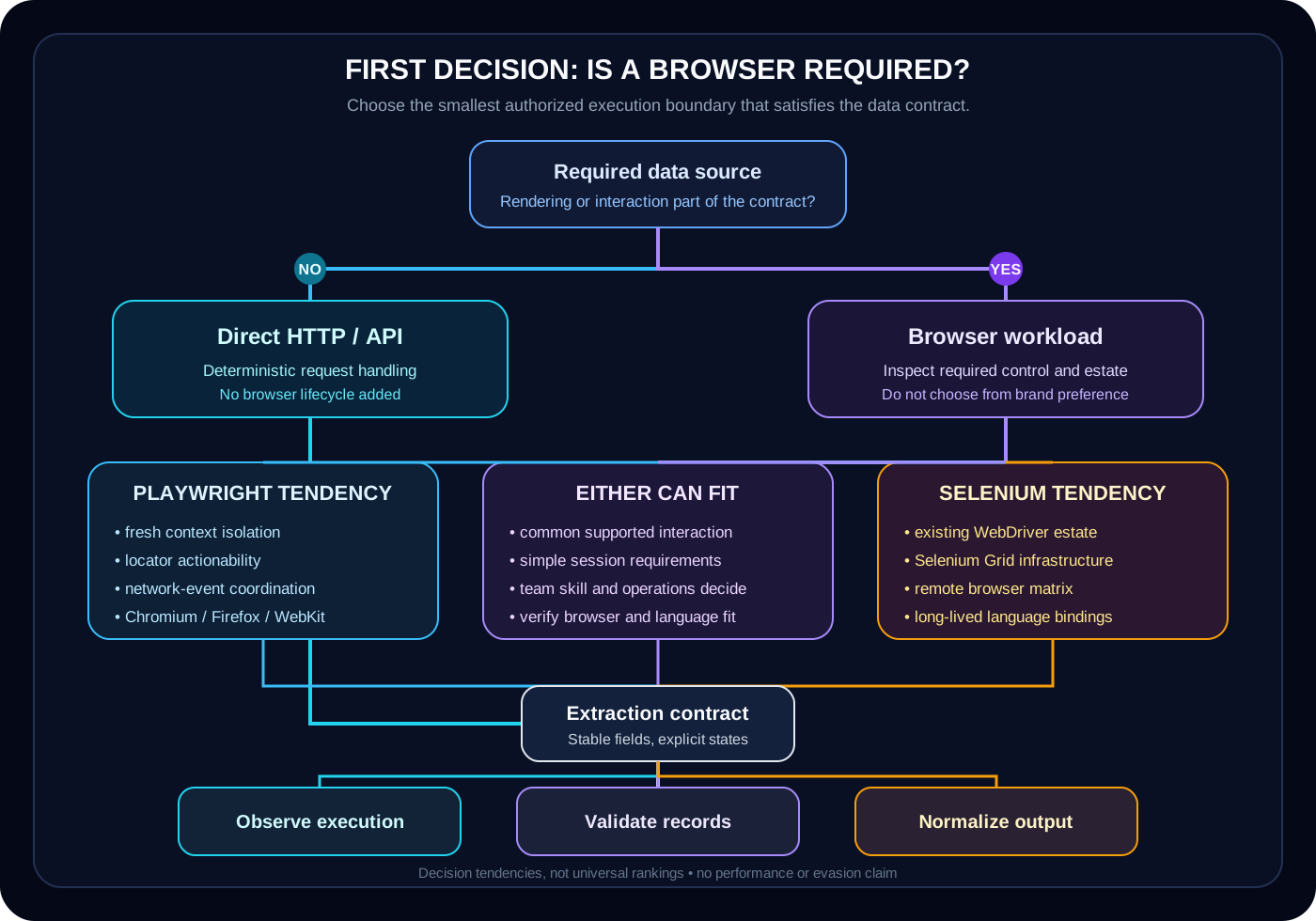
The diagram separates that first gate from the second decision. Playwright, Selenium, and direct HTTP are architecture choices with different boundaries, not positions in one universal ranking.
Playwright and Selenium solve overlapping problems
The meaningful comparison is about control models and operational fit, not a winner badge.
Both projects drive real browsers, navigate pages, locate elements, execute JavaScript, work with frames and multiple browsing contexts, upload files, and handle downloads. Both can support a responsible browser-based acquisition component. The APIs and operational ecosystems differ, but neither removes the need for an extraction contract, data validation, bounded resources, or failure handling.
Playwright packages a locator-and-actionability model, lightweight browser contexts, network events, and trace artifacts into a cohesive modern workflow. Selenium centers the standardized WebDriver model, mature official language bindings, broad browser documentation, and a long-established Grid and remote-browser ecosystem. Selenium also exposes evolving bidirectional capabilities; it is inaccurate to describe it as frozen at one-way polling.
| Dimension | Playwright tendency | Selenium tendency | Decision question |
|---|---|---|---|
| Browser control | Integrated library APIs across Chromium, Firefox, and WebKit builds | W3C WebDriver across documented browser drivers, with BiDi evolving | Which exact browser, version, protocol, and environment must be supported? |
| Synchronization | Locator actionability and auto-waiting plus explicit event waits | Navigation strategy plus explicit waits and expected conditions | Which application state proves that extraction may begin? |
| Isolation | Multiple fresh BrowserContext instances inside a browser process | WebDriver sessions, windows, and configured browser profiles | What state must be isolated, and what failure must be contained? |
| Distributed execution | Workers, sharding, remote server connection, and external orchestration | Established Selenium Grid routing and remote WebDriver infrastructure | Is there already an operating distributed-browser estate? |
| Debugging | Trace Viewer, screenshots, console, DOM snapshots, and network events | Screenshots, logs, driver tooling, Grid observability, and BiDi events | What evidence must survive a failed run? |
| Adoption cost | Often cohesive for a new supported-language browser workflow | Often lower when WebDriver suites, Grid, skills, and vendors already exist | Which choice minimizes migration and operational risk? |
Use a synthetic workload decision fixture
Transparent gates are more useful than an invented tool score.
The local fixture contains nine fictional workloads: eight valid decisions and one deliberately invalid wrong-type record. It includes a non-browser case, three Playwright-oriented cases, two Selenium-oriented cases, two cases where either tool is reasonable, and one schema failure. No case visits a real site or measures browser speed.
The model applies gates in order. No browser requirement means http_preferred. A Ruby binding constraint selects Selenium in this authored model because Selenium documents an official Ruby binding while Playwright's official language set does not include Ruby. Playwright signals include its WebKit build, fresh-context isolation, network-event coordination, and a complex modern interaction. Selenium signals include Grid, remote Grid, and an existing Selenium estate. When both or neither side has a decisive signal, the result is either_browser_tool.
These rules are educational and deliberately incomplete. For example, needs_webkit means Playwright's bundled WebKit workflow in this fixture; a requirement for branded Safari and SafariDriver must be evaluated separately. Real decisions also need browser versions, operating systems, support policy, team capability, deployment constraints, and a proof against the actual authorized workload.
examples/browser_tool_decision_fixture.json{
"fixture": "SYNTHETIC EDUCATIONAL FIXTURE — browser-tool decision model, not a benchmark",
"version": 1,
"cases": [
{"workload_id":"http-api-catalog","browser_required":false,"needs_webkit":false,"needs_grid":false,"needs_isolated_contexts":false,"existing_selenium_estate":false,"needs_network_events":false,"language_constraint":"python","needs_remote_grid":false,"interaction_complexity":"simple","expected_decision":"http_preferred"},
{"workload_id":"webkit-stateful-catalog","browser_required":true,"needs_webkit":true,"needs_grid":false,"needs_isolated_contexts":true,"existing_selenium_estate":false,"needs_network_events":true,"language_constraint":"python","needs_remote_grid":false,"interaction_complexity":"complex","expected_decision":"playwright_preferred"},
{"workload_id":"enterprise-grid-catalog","browser_required":true,"needs_webkit":false,"needs_grid":true,"needs_isolated_contexts":false,"existing_selenium_estate":true,"needs_network_events":false,"language_constraint":"java","needs_remote_grid":true,"interaction_complexity":"moderate","expected_decision":"selenium_preferred"},
{"workload_id":"simple-rendered-list","browser_required":true,"needs_webkit":false,"needs_grid":false,"needs_isolated_contexts":false,"existing_selenium_estate":false,"needs_network_events":false,"language_constraint":"python","needs_remote_grid":false,"interaction_complexity":"simple","expected_decision":"either_browser_tool"},
{"workload_id":"isolated-session-catalog","browser_required":true,"needs_webkit":false,"needs_grid":false,"needs_isolated_contexts":true,"existing_selenium_estate":false,"needs_network_events":false,"language_constraint":"javascript","needs_remote_grid":false,"interaction_complexity":"moderate","expected_decision":"playwright_preferred"},
{"workload_id":"ruby-webdriver-estate","browser_required":true,"needs_webkit":false,"needs_grid":false,"needs_isolated_contexts":false,"existing_selenium_estate":true,"needs_network_events":false,"language_constraint":"ruby","needs_remote_grid":false,"interaction_complexity":"moderate","expected_decision":"selenium_preferred"},
{"workload_id":"network-coordinated-details","browser_required":true,"needs_webkit":false,"needs_grid":false,"needs_isolated_contexts":false,"existing_selenium_estate":false,"needs_network_events":true,"language_constraint":"python","needs_remote_grid":false,"interaction_complexity":"complex","expected_decision":"playwright_preferred"},
{"workload_id":"mixed-estate-modern-flow","browser_required":true,"needs_webkit":false,"needs_grid":false,"needs_isolated_contexts":true,"existing_selenium_estate":true,"needs_network_events":true,"language_constraint":"javascript","needs_remote_grid":false,"interaction_complexity":"complex","expected_decision":"either_browser_tool"},
{"workload_id":"invalid-boolean-field","browser_required":true,"needs_webkit":"false","needs_grid":false,"needs_isolated_contexts":false,"existing_selenium_estate":false,"needs_network_events":false,"language_constraint":"python","needs_remote_grid":false,"interaction_complexity":"simple","expected_decision":"invalid_case"}
]
}examples/run_browser_tool_decision.pyfrom __future__ import annotations
import json
import sys
from pathlib import Path
from typing import Any
FIXTURE_PATH = Path(__file__).with_name("browser_tool_decision_fixture.json")
DECISIONS = {
"http_preferred",
"playwright_preferred",
"selenium_preferred",
"either_browser_tool",
}
BOOLEAN_FIELDS = (
"browser_required",
"needs_webkit",
"needs_grid",
"needs_isolated_contexts",
"existing_selenium_estate",
"needs_network_events",
"needs_remote_grid",
)
CASE_FIELDS = {
"workload_id",
*BOOLEAN_FIELDS,
"language_constraint",
"interaction_complexity",
"expected_decision",
}
LANGUAGES = {"javascript", "typescript", "python", "java", "dotnet", "ruby"}
COMPLEXITIES = {"simple", "moderate", "complex"}
INVALID = "invalid_case"
def load_fixture() -> dict[str, Any]:
fixture = json.loads(FIXTURE_PATH.read_text(encoding="utf-8"))
if not isinstance(fixture, dict) or set(fixture) != {"fixture", "version", "cases"}:
raise ValueError("fixture_schema")
if fixture["fixture"] != "SYNTHETIC EDUCATIONAL FIXTURE — browser-tool decision model, not a benchmark":
raise ValueError("fixture_label")
if type(fixture["version"]) is not int or fixture["version"] != 1:
raise ValueError("fixture_version")
if not isinstance(fixture["cases"], list) or not fixture["cases"]:
raise ValueError("fixture_cases")
return fixture
def validate_case(case: Any) -> str | None:
if not isinstance(case, dict):
return "case_not_object"
if set(case) != CASE_FIELDS:
return "missing_or_extra_fields"
if not isinstance(case["workload_id"], str) or not case["workload_id"].strip():
return "workload_id_type"
if any(type(case[field]) is not bool for field in BOOLEAN_FIELDS):
return "boolean_field_type"
if case["language_constraint"] not in LANGUAGES:
return "language_constraint"
if case["interaction_complexity"] not in COMPLEXITIES:
return "interaction_complexity"
if case["expected_decision"] not in DECISIONS | {INVALID}:
return "expected_decision"
return None
def choose(case: dict[str, Any]) -> str:
if not case["browser_required"]:
return "http_preferred"
if case["language_constraint"] == "ruby":
return "selenium_preferred"
playwright_signal = (
case["needs_webkit"]
or case["needs_isolated_contexts"]
or case["needs_network_events"]
or case["interaction_complexity"] == "complex"
)
selenium_signal = (
case["needs_grid"]
or case["needs_remote_grid"]
or case["existing_selenium_estate"]
)
if playwright_signal and not selenium_signal:
return "playwright_preferred"
if selenium_signal and not playwright_signal:
return "selenium_preferred"
return "either_browser_tool"
def main() -> None:
fixture = load_fixture()
buckets = {decision: [] for decision in DECISIONS}
invalid_ids = []
invalid_reasons = []
seen_ids = set()
for case in fixture["cases"]:
error = validate_case(case)
workload_id = case.get("workload_id", "<missing>") if isinstance(case, dict) else "<not-object>"
if workload_id in seen_ids:
raise AssertionError(f"duplicate_workload_id:{workload_id}")
seen_ids.add(workload_id)
if error is not None:
if not isinstance(case, dict) or case.get("expected_decision") != INVALID:
raise AssertionError(f"unexpected_invalid_case:{workload_id}:{error}")
invalid_ids.append(workload_id)
invalid_reasons.append(f"{workload_id}:{error}")
continue
decision = choose(case)
if case["expected_decision"] == INVALID or decision != case["expected_decision"]:
raise AssertionError(f"decision_mismatch:{workload_id}:{decision}")
buckets[decision].append(workload_id)
valid_cases = sum(len(ids) for ids in buckets.values())
lines = [
fixture["fixture"],
f"cases={len(fixture['cases'])}",
f"valid_cases={valid_cases}",
f"invalid_cases={len(invalid_ids)}",
f"http_preferred={len(buckets['http_preferred'])}",
f"playwright_preferred={len(buckets['playwright_preferred'])}",
f"selenium_preferred={len(buckets['selenium_preferred'])}",
f"either_browser_tool={len(buckets['either_browser_tool'])}",
f"http_ids={','.join(buckets['http_preferred'])}",
f"playwright_ids={','.join(buckets['playwright_preferred'])}",
f"selenium_ids={','.join(buckets['selenium_preferred'])}",
f"either_ids={','.join(buckets['either_browser_tool'])}",
f"invalid_ids={','.join(invalid_ids)}",
f"invalid_reasons={','.join(invalid_reasons)}",
]
sys.stdout.buffer.write("\n".join(lines).encode("utf-8"))
if __name__ == "__main__":
main()Expected output
SYNTHETIC EDUCATIONAL FIXTURE — browser-tool decision model, not a benchmark
cases=9
valid_cases=8
invalid_cases=1
http_preferred=1
playwright_preferred=3
selenium_preferred=2
either_browser_tool=2
http_ids=http-api-catalog
playwright_ids=webkit-stateful-catalog,isolated-session-catalog,network-coordinated-details
selenium_ids=enterprise-grid-catalog,ruby-webdriver-estate
either_ids=simple-rendered-list,mixed-estate-modern-flow
invalid_ids=invalid-boolean-field
invalid_reasons=invalid-boolean-field:boolean_field_type
Tips
- SYNTHETIC EDUCATIONAL FIXTURE only — not an industry scoring system.
- The invalid case proves that boolean-looking strings are rejected rather than coerced.
- The evaluator uses Python standard library only and emits deterministic UTF-8 bytes with LF separators and no final newline.
Compare modern browser control precisely
Browser names alone hide important implementation boundaries.
Playwright documents automation for its Chromium, Firefox, and WebKit browser builds and branded Chrome and Edge channels. Its patched Firefox is not branded Firefox, and its WebKit build is not Safari. A Safari-specific acceptance requirement therefore cannot be replaced with a vague WebKit checkbox.
Selenium WebDriver drives browsers locally or remotely through browser-specific implementations and a W3C-standardized protocol. Selenium documents Chrome, Edge, Firefox, Internet Explorer, and Safari sections; that breadth does not promise identical feature parity on every browser, operating system, binding, or version.
Lifecycle ownership matters as much as launch syntax. Define who creates the browser process, who creates and destroys a unit of isolation, which timeouts apply, how orphan processes are reaped, and what evidence survives a crash. Selenium Manager can resolve drivers and browsers as a binding fallback in current Selenium releases, so a comparison based solely on historical manual driver downloads is outdated.
Treat waiting as a state contract
sleep(5) expresses elapsed time, not application readiness.
A fixed sleep can be too short under load and unnecessarily long when the page is ready early. It does not say which condition matters, cannot explain a timeout, and often hides race conditions until the environment changes.
Playwright locators re-resolve elements and actions wait for documented actionability checks. A click, for example, requires one resolved element that is visible, stable, able to receive events, and enabled before the timeout. This reduces repeated wait code, but it does not eliminate application-specific synchronization. Data may still require a particular response, a changed record count, a completed download, or a domain state that actionability cannot infer.
Selenium waits for navigation according to the selected page-load strategy, while dynamic JavaScript can require an explicit WebDriverWait and expected condition. Keep implicit and explicit wait policy deliberate; Selenium warns that mixing them can produce unpredictable timeout behavior. In both tools, name the state you need and fail with evidence when it does not arrive.
| Need | Playwright expression | Selenium expression | Avoid |
|---|---|---|---|
| Results inserted | Wait on a locator or record-count change | WebDriverWait for visibility or count predicate | A fixed sleep |
| API response completed | Coordinate an expected response event | Use an observable application condition or supported BiDi capability | Assuming DOMContentLoaded proves data readiness |
| Popup opened | Register the popup/page event before the click | Wait for a new window handle, then switch | Switching before the new context exists |
| Download available | Pair the action with a download event | Trigger, then wait on an explicit file or browser contract | Reading a path immediately after click |
Design browser context and session isolation
Isolation is for deterministic state and failure containment, not identity evasion.
Playwright BrowserContext objects provide separate cookies, local storage, and session state inside a browser process. A worker can create a fresh context for each authorized workload, close it at the boundary, and keep a long-lived browser process only when its resource policy permits. Playwright Test creates isolated contexts automatically; library users create them explicitly.
Selenium's primary unit is a WebDriver session. A session can own multiple windows or tabs, while browser options and profiles influence persisted state. Strong isolation commonly means separate sessions or deliberately managed profiles. That may align naturally with an existing remote Grid that already schedules session capabilities across nodes.
Write down the state boundary: cookies, cache, local storage, permissions, downloads, service workers, and authenticated state. Do not reuse a context or profile merely for convenience if one failed workload can contaminate another. Conversely, do not create unlimited sessions: isolation still consumes CPU, memory, file descriptors, and remote capacity.
Select stable semantics instead of DOM depth
Selector durability depends on the page contract, not one magic syntax.
Playwright recommends locators based on user-facing attributes and explicit contracts, including roles, labels, text, and test IDs. CSS and XPath remain available. Selenium documents id, name, class, tag, CSS, link text, partial link text, and XPath, plus relative locators. It is false that Selenium forces XPath or that Playwright locators cannot break.
For a controlled local catalog, a data-testid or an agreed data attribute can be a stable extraction contract. On a third-party public page, accessible roles and meaningful labels may be more stable than nested nth-child chains, but only observation and versioned fixtures can support that choice. Separate selectors used for navigation from selectors used to validate extracted records.
When a selector changes, classify the failure. An element_not_found may be a layout drift, an empty result, a permission page, a late frame, or an application defect. A fallback selector should not silently convert the wrong page into valid output.
Model the same dynamic page before comparing tools
A fair comparison holds the workload and success contract constant.
Use a fully local synthetic catalog: JavaScript inserts the first result set after a controlled delay; a Load more button appends another page; each card opens a detail dialog; one detail view is hosted in an iframe; an optional link opens a popup; and one fixture version replaces a brittle decorative class while preserving a semantic data-testid. No request reaches a third-party site.
Success is not page loaded. The contract is: all expected cards are present, every normalized title and price passes validation, the detail state is attributable to the correct record, the changed decorative selector does not break the semantic selector, and every page or context closes. That contract makes the two implementations comparable without pretending to benchmark performance.
The examples later in this Article show only the shared delayed-results and Load more path. Frames, popups, and downloads should be added as separate test cases because each has distinct lifecycle and timeout behavior.
| State | Required observation | Failure if absent |
|---|---|---|
| Delayed results | At least one semantic catalog card becomes visible | navigation_timeout or unexpected_page_state |
| Load more | Card count increases after the interaction | element_not_found or unchanged state |
| Detail dialog | Detail record ID matches the selected card | data validation failure |
| Iframe or popup | Expected frame or browsing context exists before switching | frame_not_ready or popup_not_opened |
| Changed class | Semantic selector still resolves the record | stale_or_changed_selector |
Use network control for coordination and diagnosis
Network visibility can reveal a cleaner contract, but it is not permission.
Playwright can observe requests and responses, wait for a specific response, and route HTTP traffic at page or context scope. In a controlled environment, routing can block unnecessary first-party asset categories or fulfill deterministic test fixtures. Service workers can affect which requests are observable, so test the actual deployment boundary.
Selenium's classic WebDriver model focuses on browser commands. Selenium's WebDriver BiDi work adds bidirectional event APIs, including network-related capabilities, with support depending on the binding, browser, and Selenium version. Do not reduce the modern comparison to the outdated claim that Selenium has no network visibility.
Use network evidence to diagnose why a view is incomplete, coordinate against an explicit response, or capture an authorized structured response. Do not intercept requests to bypass access controls. If the application exposes a stable permitted JSON endpoint that is the real data contract, direct HTTP ingestion may be preferable to DOM extraction.
Handle tabs, popups, frames, uploads, and downloads explicitly
Secondary browsing contexts need ownership and cleanup.
In Playwright, one BrowserContext can contain multiple Page objects. Register a page or popup event before the action that opens it, then validate its URL or state before extraction. FrameLocator provides a frame-scoped locator boundary rather than requiring global selector guesses.
In Selenium, each tab or window has a handle within the WebDriver session; wait for the handle set to change, switch deliberately, and return or close it deterministically. Frame interactions likewise require switching into the frame and restoring the parent or default content.
Uploads and downloads are not ordinary clicks. Validate file type and size before upload, keep fixture paths local and synthetic, bind download initiation to an expected action, use bounded destinations, and clean temporary files. JavaScript execution should be a narrow adapter for a proven need rather than a shortcut around an unclear page contract.
Bound parallel browser execution
More tabs do not create unlimited safe concurrency.
Every page, context, session, and browser process consumes CPU, memory, file descriptors, network capacity, and target-system capacity. A queue should apply an explicit concurrency budget based on measured resource use in the actual environment and the authorized source's limits, not on an arbitrary number copied from another deployment.
Playwright Test can run files in worker processes and shard suites across machines. Library-based scraping still needs application-level workers, queues, timeouts, and process cleanup. Selenium Grid routes remote WebDriver sessions across nodes and browser capabilities; Grid is infrastructure, not a substitute for workload admission, retries, or data validation.
Prefer bounded work units with maximum session lifetime, cancellation, and a finally-style cleanup path. A browser crash should lose one contained work unit, not leak every pending item or trigger an unbounded retry storm.
Understand Selenium Grid and remote execution
Existing distributed infrastructure can outweigh a cleaner local API.
Selenium Grid is an established way to route WebDriver commands to remote browser sessions across machines, browser versions, and platforms. Its Router, Distributor, Session Map, New Session Queue, Event Bus, and Nodes separate routing and capacity responsibilities. Teams with operating Grid observability, capability policy, browser images, and support expertise already own valuable infrastructure.
Playwright is not local-only. Its browser type API can launch a server and connect over a WebSocket endpoint, and Playwright Test can shard work in external CI orchestration. That is a real remote execution path, but it is not identical to Grid's standard remote WebDriver role or ecosystem.
Evaluate connection compatibility, version coupling, artifact collection, capacity admission, session leases, and crash cleanup. Paid browser clouds may support either ecosystem, but vendor availability alone should not determine architecture; verify the exact browser, feature, data handling, and retention contract.
Match the language and existing automation estate
Migration cost and operational knowledge are first-class constraints.
Playwright officially documents JavaScript and TypeScript, Python, Java, and .NET. The core automation features share an underlying implementation, while runner and ecosystem integration vary; Node.js has the dedicated Playwright Test runner.
Selenium documents official installation paths for Java, Python, .NET/C#, Ruby, and JavaScript, with Kotlin using the Java binding. Its long-lived WebDriver ecosystem, Grid deployments, browser vendors, and enterprise test suites can make Selenium the lower-risk choice even when a greenfield code sample appears longer.
Do not migrate a stable Selenium estate solely for auto-waiting aesthetics, and do not adopt Grid solely because it is mature. Compare the required language, browser matrix, support lifecycle, CI integration, debugging evidence, team skills, and the cost of operating two automation stacks.
Preserve debugging and tracing evidence
A failed run should explain what the browser saw and which state was missing.
Playwright Trace Viewer can expose an action timeline, logs, source, network activity, errors, console messages, and interactive DOM snapshots when tracing is configured. Screenshots and targeted network records can supplement the trace. Retain them under an explicit privacy and expiry policy because page artifacts can contain personal or authenticated data.
Selenium workflows can capture screenshots, browser and driver logs, application logs, and remote node or Grid telemetry. Grid also documents tracing and logging configuration, while WebDriver BiDi expands event-driven visibility. The exact evidence depends on browser, binding, driver, and deployment.
Use correlation IDs across queue item, browser session or context, extraction result, and stored artifacts. Record the selector or state predicate, timeout class, URL classification, and cleanup outcome without logging secrets, session tokens, or unnecessary page content.
Implement the same synthetic workflow in both tools
Comparable examples use the same URL, selectors, success condition, and cleanup boundary.
These concise Python excerpts target only the local synthetic catalog described earlier. They are illustrative API comparisons, not the executable evidence gate and not a browser-speed benchmark. Both wait for cards, click the same semantic Load more control, require the card count to increase, extract the same normalized fields, and close their owned browser state.
The Playwright example expresses readiness through locator and page primitives. The Selenium example expresses the same state with WebDriverWait predicates. Neither example is intentionally handicapped; production code would add typed validation, structured errors, artifact capture, bounded retries, and worker-level cancellation.
examples/playwright_synthetic_catalog.pyfrom playwright.sync_api import sync_playwright
URL = "http://127.0.0.1:8000/catalog.html"
CARD = "[data-testid='catalog-card']"
with sync_playwright() as playwright:
browser = playwright.chromium.launch()
context = browser.new_context()
page = context.new_page()
page.goto(URL, wait_until="domcontentloaded")
page.locator(CARD).first.wait_for()
load_more = page.get_by_test_id("load-more")
while load_more.is_visible():
previous = page.locator(CARD).count()
load_more.click()
page.wait_for_function(
"count => document.querySelectorAll('[data-testid=\"catalog-card\"]').length > count",
previous,
)
records = [
{
"title": card.get_by_test_id("title").inner_text().strip(),
"price": card.get_by_test_id("price").inner_text().strip(),
}
for card in page.locator(CARD).all()
]
context.close()
browser.close()examples/selenium_synthetic_catalog.pyfrom selenium import webdriver
from selenium.webdriver.common.by import By
from selenium.webdriver.support import expected_conditions as EC
from selenium.webdriver.support.ui import WebDriverWait
URL = "http://127.0.0.1:8000/catalog.html"
CARD = "[data-testid='catalog-card']"
driver = webdriver.Chrome()
try:
driver.get(URL)
wait = WebDriverWait(driver, 10)
wait.until(EC.visibility_of_element_located((By.CSS_SELECTOR, CARD)))
while True:
buttons = driver.find_elements(By.CSS_SELECTOR, "[data-testid='load-more']")
if not buttons or not buttons[0].is_displayed():
break
previous = len(driver.find_elements(By.CSS_SELECTOR, CARD))
buttons[0].click()
wait.until(
lambda current: len(current.find_elements(By.CSS_SELECTOR, CARD)) > previous
)
records = [
{
"title": card.find_element(By.CSS_SELECTOR, "[data-testid='title']").text.strip(),
"price": card.find_element(By.CSS_SELECTOR, "[data-testid='price']").text.strip(),
}
for card in driver.find_elements(By.CSS_SELECTOR, CARD)
]
finally:
driver.quit()Assign failures to the right boundary
Tool errors, page changes, and invalid data require different responses.
A navigation_timeout, browser_crash, or session_lost points first to execution and infrastructure. element_not_found, stale_or_changed_selector, frame_not_ready, popup_not_opened, download_timeout, and unexpected_page_state may indicate synchronization, a site or fixture change, or a wrong-page response. network_dependency_failure belongs to the upstream dependency contract. A page that loads but yields malformed records is a data validation failure.
Retries should follow classification. A bounded retry may make sense for a transient network dependency or a fresh session after a browser crash. Repeating an unchanged selector against a redesigned page is not recovery. Invalid normalized data should be quarantined rather than published because the browser command succeeded.
Keep an explicit terminal state and reason code. Preserve enough evidence to reproduce the state, but avoid recording credentials, private content, or unrestricted full-page archives.
| Failure class | Examples | First response |
|---|---|---|
| Browser or tool | browser_crash, session_lost, navigation_timeout | Capture process/session evidence, clean up, and apply a bounded classified retry |
| Page contract | stale_or_changed_selector, frame_not_ready, popup_not_opened, unexpected_page_state | Compare versioned fixture and page-state markers; do not silently fall back |
| Interaction artifact | element_not_found, download_timeout | Inspect the expected condition and action ownership before retrying |
| Dependency | network_dependency_failure | Apply dependency-specific timeout, status, and backoff policy |
| Data | missing field, invalid type, impossible value | Reject or quarantine the record even if browser automation completed |
Engineer operational reliability outside the library
Neither API supplies queue discipline, capacity policy, or data correctness automatically.
Own browser process cleanup on success, failure, cancellation, and worker termination. Set navigation, action, response, download, and total work-item timeouts. Bound retries by failure class, add jitter only where appropriate, and stop retrying permanent layout or policy failures.
Enforce a maximum session lifetime and bounded concurrency. Detect orphan processes and resource growth. Restore interrupted work from a durable queue or checkpoint without duplicating downstream writes. Keep extraction and publication idempotent, and validate staged records before a final destination sees them.
The TikTok Browser Automation System case study is a public-code example of browser automation behind batch/job, queue, and worker boundaries. It is not a performance benchmark or evidence of production scale, and it is not presented as instructions for bypassing platform safeguards.
Capture structured logs, duration distributions, timeout counts, crash counts, validation failures, queue age, and cleanup failures. These are suggested operational signals, not results measured by this Article. Screenshots and traces should be sampled and retained according to privacy, security, and cost policy.
For deeper Python boundaries, testing, and packaging, continue with the
- Python skills guide for validation, typing, testing, and dependency discipline.
- Backend engineering roadmap for APIs, queues, storage, observability, and operations.
Choose Playwright, Selenium, or either from constraints
Preference is a result of requirements, not the starting premise.
Playwright is often a strong fit for a new workflow in its supported language set when fresh context isolation, locator actionability, coordinated network events, integrated tracing, multiple pages, or its Chromium, Firefox, and WebKit builds are central. Verify exact browser and deployment requirements rather than treating this tendency as a guarantee.
Selenium is often a strong fit when a team already operates Grid, depends on WebDriver-compatible remote infrastructure, needs its documented language or browser ecosystem, or must extend a long-lived Selenium automation estate. Mature infrastructure and team knowledge can matter more than line count in a new example.
Either can be reasonable for a supported browser interaction with ordinary navigation, stable selectors, explicit readiness, and no decisive estate constraint. Prototype the riskiest authorized state, capture failure evidence, and compare total operational ownership. The correct outcome can also remain HTTP/API.
| Workload signal | Likely direction | Verification still required |
|---|---|---|
| No rendering or interaction requirement | HTTP/API preferred | Authorization, endpoint stability, schema, and rate policy |
| Fresh contexts, modern event coordination, supported WebKit-build requirement | Evaluate Playwright first | Exact browser identity, language, remote model, and failure behavior |
| Existing Grid, WebDriver estate, Ruby binding, established remote matrix | Evaluate Selenium first | Driver/browser compatibility, BiDi needs, capacity, and observability |
| Simple common browser interaction | Either browser tool | Team fit, lifecycle, debugging, CI, and maintenance cost |
| Conflicting modern-flow and estate constraints | Prototype both boundaries | Migration cost and the riskiest real state, not a synthetic score |
Keep the evidence boundary explicit
Documentation and synthetic code demonstrate mechanisms, not production outcomes.
Official documentation supports the described APIs, browser models, waits, contexts, Grid, and tracing boundaries. The local evaluator proves only that nine authored records are validated and routed by its published gates. The illustrative snippets show comparable API shapes against a fictional local page. The architecture SVG explains decision flow.
None of this evidence measures runtime, memory, throughput, production reliability, anti-bot behavior, or business value. It does not prove that Playwright is universally faster, that Selenium is obsolete, that either tool handles every browser equally, or that a documented feature is correct for an untested deployment.
| Evidence | What it demonstrates | What it does NOT prove |
|---|---|---|
| Official Playwright documentation | Documented locators, actionability, contexts, pages, network events, tracing, languages, and browser builds | Universal speed, memory superiority, or fitness for every browser workload |
| Official Selenium and W3C documentation | WebDriver, waits, browser bindings, Grid, Manager, window/frame control, and evolving BiDi boundaries | That every binding/browser combination has identical behavior or that maturity removes failures |
| Synthetic decision fixture | Transparent authored gates including HTTP, Playwright, Selenium, either, and invalid outcomes | A universal industry score or a recommendation for an unmodeled workload |
| Comparable code excerpts | How each Python API can express one local dynamic-card workflow with condition-based waits | A performance benchmark, production throughput, or universal reliability |
| Architecture SVG | The browser-needed gate and the constraints that influence tool selection | Operational deployment evidence or measured results |
| Deterministic evaluator execution | Fixture schema enforcement, decision consistency, and reproducible stdout | Real-site scraping, browser execution, anti-bot capability, or client outcomes |
Automate responsibly and use the final checklist
Technical capability does not create authorization.
Confirm whether data is public or private, who authorizes access, applicable terms and policies, robots signals, rate limits, authentication boundaries, personal-data handling, retention, and deletion. Robots rules are one signal and not a substitute for authorization. A browser must not be used to cross a boundary that direct HTTP should respect.
This Article provides no CAPTCHA bypass, stealth plugin, fingerprint spoofing, residential proxy rotation, anti-bot evasion, account-limit circumvention, credential stuffing, or authentication bypass guidance. Network routing is discussed only for controlled testing, permitted observation, and diagnosis.
Final decision: prove that a browser is required; list the exact browser and language matrix; define readiness and extraction contracts; choose the isolation unit; classify network, popup, frame, and download needs; account for Grid or existing estate; budget concurrency and lifetime; preserve safe failure evidence; validate normalized output; and run a small authorized prototype before standardizing.
For the broader career and system-design context, connect this decision to the
- AI automation engineering guide while keeping browser automation as one bounded tool rather than the whole architecture.
- Prefer direct ingestion when a stable permitted endpoint satisfies the contract.
- Never equate a successful browser command with valid or authorized data.
- Document why the selected tool fits and what evidence would force a re-evaluation.
FAQ
Is Playwright always better than Selenium for scraping?
No. Playwright often fits new supported-language workflows that value fresh contexts, locator actionability, network events, and integrated tracing. Selenium may fit better when Grid, WebDriver infrastructure, browser requirements, language bindings, or an existing automation estate dominate. Either may be reasonable, and sometimes direct HTTP or an API is the correct answer.
Does Playwright auto-waiting remove every synchronization problem?
No. Actionability waits help with element actions, but application-specific readiness can still depend on a response, record-count change, frame, popup, download, or domain state. Those conditions need explicit contracts and bounded waits.
Does Selenium require fixed sleeps and manual driver downloads?
No. Selenium documents explicit waits and expected conditions, and Selenium Manager is used by current bindings as a driver and browser management fallback. Fixed sleeps remain an unreliable readiness strategy in either tool.
Does this comparison benchmark Playwright and Selenium performance?
No. The executable evidence is a standard-library-only synthetic decision fixture. It launches no browser, visits no real site, and measures no speed, memory, throughput, reliability, or business outcome.
Can browser automation be used to bypass site protections?
This guide does not provide bypass or evasion instructions. Authorization, policies, robots signals, rate limits, authentication boundaries, and personal-data obligations must be reviewed before automation.
Sources
Primary and authoritative sources reviewed for this article.
- Playwright documentation — Browsers
Reviewed for Chromium, Firefox, WebKit, and branded-channel support boundaries, including the distinction from branded Firefox and Safari.
- Playwright documentation — Supported languages
Reviewed for the official JavaScript/TypeScript, Python, Java, and .NET language set and runner differences.
- Playwright documentation — Locators
Reviewed for locator re-resolution, user-facing selector guidance, test IDs, CSS, and XPath.
- Playwright documentation — Auto-waiting
Reviewed for locator actionability checks, timeout behavior, and the boundary of automatic synchronization.
- Playwright documentation — Browser contexts
Reviewed for isolated cookies, local storage, session storage, and explicit context creation outside Playwright Test.
- Playwright documentation — Network
Reviewed for request/response events, routing, fulfillment, aborting, and the service-worker visibility caveat.
- Playwright documentation — Pages and popups
Reviewed for Page objects, multiple pages per context, popup events, and page lifecycle.
- Playwright documentation — Frames
Reviewed for frame-scoped locators and frame interaction.
- Playwright documentation — Trace Viewer
Reviewed for action, log, source, network, error, console, and DOM snapshot evidence.
- Playwright documentation — Parallelism and sharding
Reviewed for Playwright Test worker processes and sharding; application-level orchestration remains separate.
- Playwright API — BrowserType
Reviewed for browser launch, launchServer, and WebSocket connection capabilities and version compatibility.
- Selenium documentation — WebDriver
Reviewed for local and remote browser control through the WebDriver model and its W3C Recommendation basis.
- Selenium documentation — Waiting strategies
Reviewed for navigation readiness, implicit and explicit waits, expected conditions, and the warning against mixing wait types.
- Selenium documentation — Locator strategies
Reviewed for Selenium's documented locator strategies and relative locators.
- Selenium documentation — Windows and tabs
Reviewed for window handles, tabs, windows, switching, and session ownership.
- Selenium documentation — Frames
Reviewed for switching into and out of frames.
- Selenium documentation — Grid
Reviewed for routing WebDriver commands to remote browsers and parallel execution across machines, versions, and platforms.
- Selenium documentation — Grid architecture
Reviewed for Router, Distributor, Session Map, New Session Queue, Event Bus, and Node responsibilities.
- Selenium documentation — Selenium Manager
Reviewed for automated driver and browser management fallback in Selenium bindings.
- Selenium documentation — WebDriver BiDi
Reviewed for the evolving bidirectional event model and Selenium's compatibility path from classic WebDriver.
- Selenium documentation — Install a Selenium library
Reviewed for official Java, Python, .NET/C#, Ruby, and JavaScript installation paths, with Kotlin using Java bindings.
- Selenium documentation — Supported browsers
Reviewed for the browser-specific WebDriver documentation; no identical feature-parity claim is inferred.
- W3C WebDriver Recommendation
Reviewed for the platform- and language-neutral remote-control wire protocol standardized as a W3C Recommendation.
- Python 3.12 documentation — json
Reviewed for the standard-library JSON parsing used by the deterministic synthetic evaluator.
Conclusion
The defensible choice begins one level above the libraries: establish whether browser execution is necessary. If it is, compare Playwright and Selenium against the exact browser, synchronization, isolation, network, language, Grid, debugging, and operational contract. Keep the decision reversible and evidence-backed, then place the chosen browser adapter inside a validated production scraping pipeline rather than mistaking automation success for trustworthy data.