Evidence-based implementation walkthrough
PSA Card Scanner and Batch Processor — Technical Case Study
This public project connects browser image preparation and selected barcode detection to a FastAPI processing boundary and persisted result states. The walkthrough is based on inspectable source code, not performance benchmarks, production telemetry, or client outcome claims.

Project at a glance
Frontend
React 19 and Vite browser interface
Image boundary
Canvas resize, compression, crop, rotation, and filters
Detection
Native BarcodeDetector with ZXing fallback
Backend
Python, FastAPI, Uvicorn, and HTTPX
State
SQLAlchemy process records backed by PostgreSQL
Evidence
Public source repository and recorded demo
The scanning workflow
The implemented path begins with multiple image selection or live camera input. Image files are prepared in the browser, decoded values enter a local queue, and each value crosses the FastAPI boundary. A background task updates a PostgreSQL-backed process record while the frontend polls for a complete, partial, or error result.
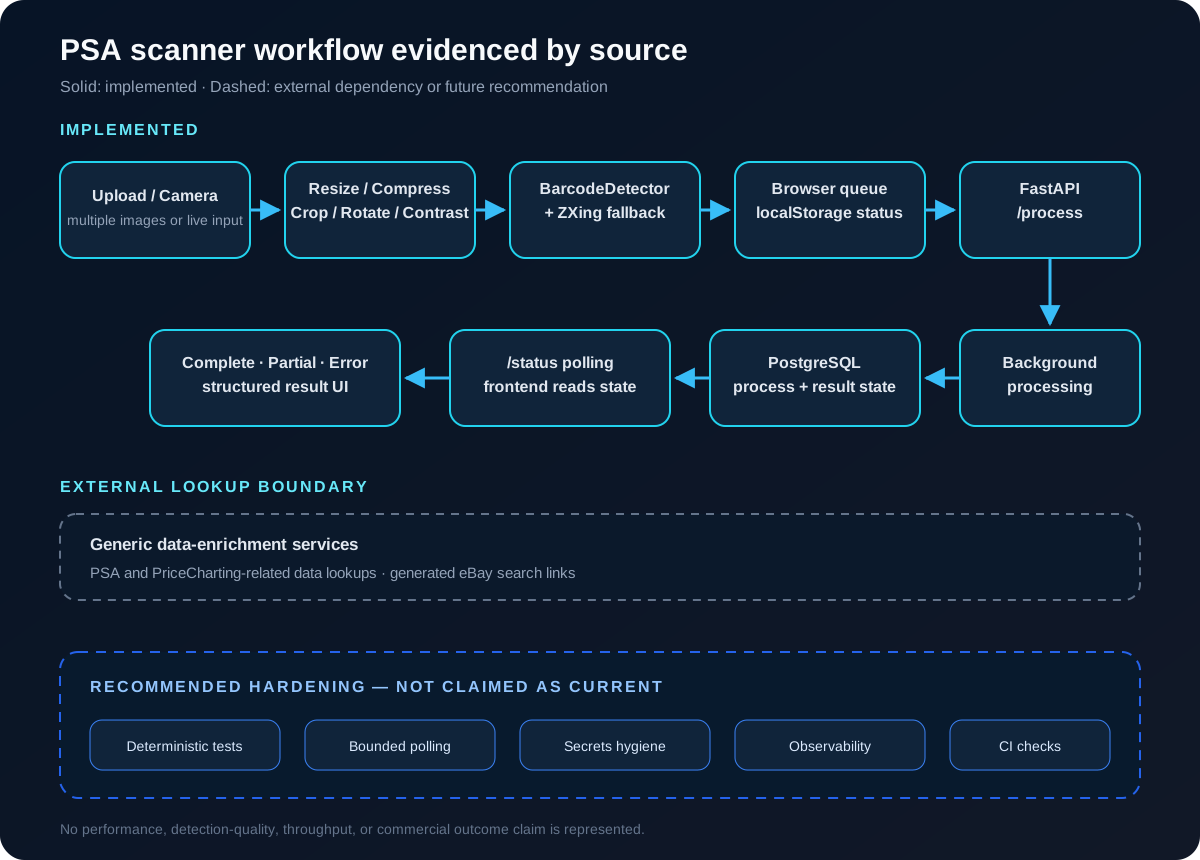
Client-side image processing
Uploaded images are read into Canvas-backed data, resized and compressed before they enter the queue. The scanner normalizes large images and generates transformed regions across selected rotations, scales, contrast levels, brightness adjustments, and binary thresholds. A manual ReactCrop editor also lets a user isolate and rotate a region for another scan attempt. These are implemented transformations; they are not evidence of measured detection quality.
Barcode detection boundary
Uploaded images
Code 128 and Code 39 format hints.
Camera mode
Code 128, Code 39, EAN-13, and UPC-A format hints.
The image path tries the browser's native BarcodeDetector where available and then uses ZXing as a fallback. README material describes QR support, but the implemented format hints inspected for these paths do not establish it. This case study therefore does not present QR as an implemented capability.
Browser queue and status model
Queue items and the selected scan mode are stored in localStorage. Pending image and camera items carry explicit UI states, and auto-processing selects up to two eligible items at a time before marking them as scanning or backend processing. This is a browser-local workflow queue, not a durable server-side job queue.
FastAPI and backend state
The POST /process endpoint checks for a cached complete or partial record, creates a new process record when needed, and schedules a FastAPI background task. SQLAlchemy persists the barcode, result JSON, error message, timestamp, and state. The frontend polls GET /status/{process_id} until it receives a terminal result.
Structured output and enrichment
Evidence-supported output includes the decoded barcode, a structured result object, PSA and PriceCharting-related fields when available, generated eBay search links, persisted JSON text, and copy controls in the result UI. No CSV creation or export path appears in the inspected implementation, so CSV output is not claimed here.
Evidence-supported code excerpts
These deliberately small excerpts show safe architectural boundaries from the public repository. They contain no environment values, API keys, card identifiers, or local filesystem paths.
Multiple-image ingestion
frontend/src/components/ImageUpload.jsx
const files = Array.from(e.target.files);
const processedFiles = [];

for (const file of files) {
  processedFiles.push(await compressImage(file));
}

if (onImagesQueued) onImagesQueued(processedFiles);
Uploaded-image format hints
frontend/src/utils/scannerUtils.js
const hints = new Map();
hints.set(DecodeHintType.POSSIBLE_FORMATS, [
  BarcodeFormat.CODE_128,
  BarcodeFormat.CODE_39,
]);
hints.set(DecodeHintType.TRY_HARDER, true);
Persisted process states
backend/models.py
class CardProcess(Base):
    __tablename__ = "card_processes"
    id = Column(Integer, primary_key=True, index=True)
    barcode = Column(String, index=True)
    status = Column(String, default="pending")
    result_json = Column(Text, nullable=True)
    error_message = Column(String, nullable=True)
Process and status boundaries
backend/main.py
@app.post("/process")
def process_barcode(req: ProcessRequest, background_tasks: BackgroundTasks,
                    db: Session = Depends(get_db)):
    new_process = CardProcess(barcode=req.barcode)
    db.add(new_process)
    db.commit()
    db.refresh(new_process)
    background_tasks.add_task(run_pipeline, req.barcode, new_process.id)

@app.get("/status/{process_id}")
def get_status(process_id: int, db: Session = Depends(get_db)):
Error handling
Current implementation evidenced by source
- Image read failures reject the client-side preparation operation.
- An undecoded image becomes a barcode-not-found error state.
- Network and API failures become visible queue-item errors.
- The backend exposes not-found, server, and database-unavailable responses.
- Persisted states distinguish pending, processing, complete, partial, and error.
- Database startup retries and lookup failure can produce a partial result.
What the public evidence proves
| Evidence | Demonstrates | Does not prove |
|---|---|---|
| React/Vite interface | Browser-based input and workflow UI | Production adoption or usability outcomes |
| BarcodeDetector + ZXing | Selected barcode formats are implemented | Universal detection or measured quality |
| Canvas preprocessing | Resize, crop, rotation, and filter paths | A validated computer-vision model |
| FastAPI backend | A process/status API and background-task boundary | Throughput or service-level guarantees |
| PostgreSQL state | Persisted process and result status | Backup, recovery, or durability guarantees |
| Public demo | A recorded interface and workflow | Measured performance or privacy clearance |
| Public repository | Inspectable implementation evidence | Commercial success or client outcomes |
What the evidence does not establish
The inspected implementation does not establish QR support, OCR, CSV export, folder-based processing, measured detection quality, throughput, production scale, time savings, client or business outcomes, or a service-level guarantee. The README also lists OpenCV, Pyzbar, NumPy, and Pillow, but those libraries do not describe the current scanner path evidenced by the frontend package and source.
What I would harden next
Future recommendations — not current claims
- Add deterministic scan fixtures and API, state-transition, and integration tests.
- Bound status polling with timeouts, cancellation, and explicit terminal contracts.
- Define structured retry policies for each external integration boundary.
- Add input limits, format validation, privacy review, and safe media-retention rules.
- Introduce structured logs, traces, health signals, and operator-visible failure context.
- Clean environment files, local paths, generated dependencies, and caches from public history.
- Run lint, tests, secret scanning, and repository-hygiene checks in CI.
- Build an evaluation harness before publishing any detection or performance statement.
Repository and demo hygiene
Before using a public repository as portfolio evidence, generated dependencies, environment files, local paths, logs, and potential secrets should be reviewed and cleaned. This observation identifies a review requirement; it does not claim that an active secret was verified or exposed.
The embedded demo remains a visual demonstration of the workflow; individual frames should be reviewed for portfolio privacy before broader reuse. No card identifiers are transcribed or reproduced in this case study.
What this project demonstrates
The public implementation demonstrates frontend/backend integration, browser image preparation, selected barcode formats, local queue state, an asynchronous API boundary, persisted process states, structured results, and visible failure states. Its strongest portfolio value is the inspectable separation of those boundaries.
Review the implementation
Read the public source for implementation evidence, watch the recorded workflow, or return to the portfolio for other projects.