OpenTelemetry for LLM Apps: A Practical Observability Blueprint
A practical guide to tracing AI workflows, measuring latency and token use, debugging tool failures, and protecting prompt data with OpenTelemetry.
An AI feature can return a plausible answer and still fail the user: retrieval may have returned the wrong documents, a tool may have timed out, a retry may have doubled cost, or the model may have taken ten seconds before producing its first token. Ordinary request logs often flatten these steps into one opaque call. OpenTelemetry gives teams a common way to connect traces, metrics, and logs across the application and its dependencies. This guide turns that idea into a practical blueprint for Python LLM applications: what to instrument, which signals to watch, how to investigate failures, and how to keep sensitive prompt data out of telemetry by default.
Start with the question each signal must answer
Collect evidence that helps an engineer make a decision, not telemetry for its own sake.
A trace answers, “What happened during this particular request, and where did the time or error occur?” A metric answers, “Is this happening more often, and how does it vary by model, workflow, or release?” A structured log adds discrete context that is useful for investigation. These signals work best together: a latency alert points to a time window, a trace reveals the slow retrieval or model span, and a carefully scoped log explains the application decision.
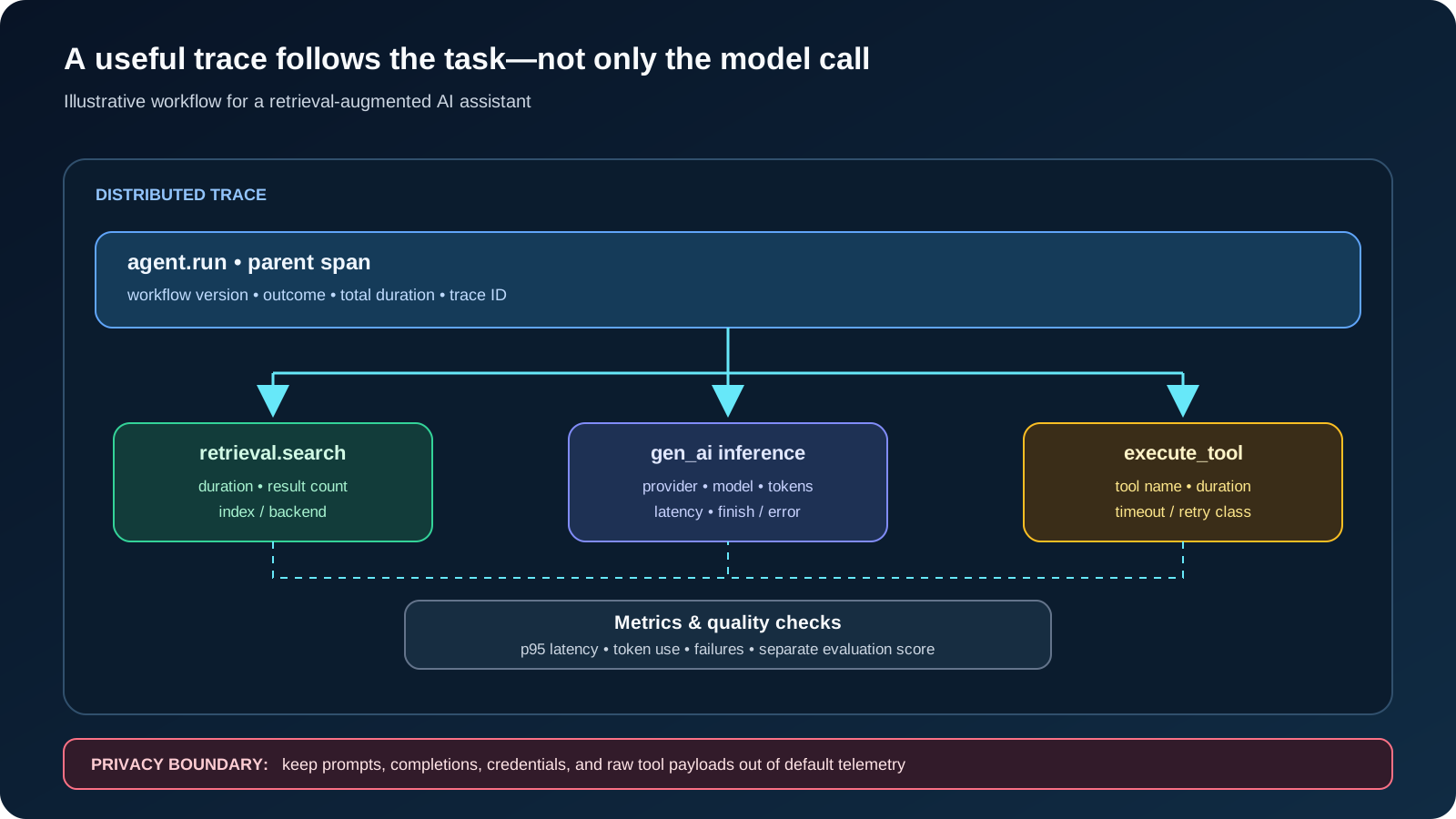
For an agent, the top-level unit should usually represent the user-visible task or workflow, not just one provider API call. The task may include retrieval, several model calls, tool execution, validation, and retries. If each layer creates an unrelated trace, an engineer cannot tell whether a slow answer came from the model, the database, an external tool, or orchestration code.
Observability does not replace offline and online quality testing. Use it alongside the LLM evaluation pipeline guide and the Python testing guide for LLM applications so that operational health and answer quality are measured separately.
| Signal | Best question | Useful example |
|---|---|---|
| Trace | Where did this request spend time or fail? | One task with retrieval, model, tool, and validation child spans |
| Metric | Is the service getting slower, more expensive, or less reliable? | Latency percentiles, token usage, timeout rate, and request volume |
| Structured log | What decision or state transition needs explanation? | A retry reason or validation outcome without storing the full prompt |
| Evaluation result | Was the answer actually correct and useful? | A versioned test case with expected behavior and a graded result |
Shape a trace around the whole AI task
A parent span makes the workflow legible; child spans explain each dependency.
For a retrieval-augmented assistant, a useful trace might contain a workflow span, a retrieval span, one or more model-inference spans, tool-execution spans, and a final validation span. A multi-step agent can have repeated model and tool children. Keep span names predictable and attributes consistent so traces from different releases can be compared.
OpenTelemetry's GenAI span conventions describe common operations such as inference, retrieval, agent invocation, and tool execution. The convention repository currently marks this area as under development, so pin the convention/instrumentation version and confirm what your libraries actually emit before building dashboards.
Do not assume every framework automatically instruments every boundary. Provider integrations may trace model calls while your own code still needs spans around retrieval, tool authorization, business rules, and response validation. Avoid creating duplicate spans for the same operation when an automatic instrumentor already covers it.
| Prefer structured metadata | Avoid by default | Reason |
|---|---|---|
| Provider, model, operation, environment, release | Full prompts and completions | Content may contain confidential or personal data |
| Prompt-template version and workflow name | Raw tool arguments and tool results | Arguments can include account data, documents, or secrets |
| Token counts, duration, error class | API keys, authorization headers, session cookies | Credentials must not enter telemetry |
| A short-lived trace ID | Email addresses or raw customer identifiers as metric labels | High cardinality and privacy risk |
Add application-level spans in Python
Instrument the boundaries your team owns, then connect them to supported provider instrumentation.
The official OpenTelemetry Python instrumentation guide shows how to obtain a tracer and create spans. The example below is a small application-boundary pattern, not a complete exporter setup or a provider-specific SDK integration. Replace the placeholder function with your existing workflow code and configure a real SDK/exporter for your environment.
The parent span records stable workflow metadata and marks failures without attaching the user's request or exception message. Provider-specific instrumentation should create the child inference spans and record supported model/token attributes. If you manually instrument a tool, include its operation name and duration, and make sure a retry is represented clearly rather than hidden as an unexplained extra call.
workflow_instrumentation.pyfrom opentelemetry import trace
from opentelemetry.trace import Status, StatusCode
tracer = trace.get_tracer("my_ai_application")
def run_assistant(request: str):
# Do not attach `request` or raw model content to the span.
with tracer.start_as_current_span("agent.run") as span:
span.set_attribute("app.workflow.name", "support-assistant")
span.set_attribute("app.workflow.version", "2026-10")
try:
# Replace with your retrieval/model/tool orchestration.
result = execute_assistant_workflow(request)
span.set_attribute("app.outcome", "success")
return result
except Exception as exc:
# Keep exception details out of telemetry unless reviewed/redacted.
span.set_attribute("error.type", type(exc).__name__)
span.set_status(Status(StatusCode.ERROR))
raiseTips
- Give spans a clear start and end around the actual operation, including time spent waiting on retries.
- Record stable workflow and release identifiers so a regression can be compared across deployments.
- Use provider/framework instrumentation for model-specific attributes where available; do not invent semantic-convention names just to fill a dashboard.
Measure latency, usage, and reliability separately
A single average response time hides the failure modes that matter to users.
For interactive applications, measure end-to-end latency and, where streaming is used, time to first token or first chunk separately from the time needed to finish the response. A user may perceive a long silent pause as a failure even if the total request eventually succeeds. For agent workflows, also measure the time spent in retrieval, tool execution, validation, and queueing so that model latency is not blamed for a slow dependency.
OpenTelemetry's GenAI metrics conventions define token-usage and duration measurements, but names and stability can change while the conventions evolve. Use the specification and instrumentation version you have pinned; do not copy a dashboard query from an older blog post without checking the emitted metric names.
Token counts are useful operational measurements, not automatically an invoice. If you estimate spend, keep the provider's pricing schedule, cached-token treatment, model version, and calculation date explicit. Label the result as an estimate and reconcile it with provider billing data before using it for financial reporting.
| Measure | Break down by | Why it matters |
|---|---|---|
| End-to-end latency (p50/p95/p99) | Workflow, release, region | Shows the user-visible tail, not only the average |
| Time to first token/chunk | Model, streaming mode | Finds slow starts that make an interface feel stuck |
| Input/output token usage | Provider, model, workflow | Identifies context growth and unusually expensive tasks |
| Tool timeout and retry rate | Tool name, error class | Reveals brittle dependencies and retry storms |
| Successful task rate | Workflow version and evaluation cohort | Connects operational availability with task completion |
Keep telemetry useful without leaking prompts
Sensitive content should be an explicit, reviewed exception—not the default debugging strategy.
Prompts, retrieved documents, model output, and tool arguments can contain personal information, confidential business records, credentials, or customer data. The OpenTelemetry project's own GenAI walkthrough explains that content capture is disabled by default in its described setup, while enabling it can add full prompt messages, system instructions, tool schemas, arguments, and results to span attributes. That can help with debugging, but it changes the privacy and retention risk substantially.
Start with metadata-only tracing. If a difficult incident genuinely requires payload inspection, use a documented, time-limited procedure: obtain the right approval, redact sensitive fields, restrict access, set a short retention window, and record who enabled capture. Do not put prompt text into metric labels; metrics are intended for aggregation and high-cardinality content can overwhelm a telemetry backend as well as expose data.
Treat telemetry storage as a production data system. Review exporter destinations, access controls, retention, sampling, deletion, and vendor processing terms. Redaction in the application is preferable to relying on every downstream dashboard or collector to remember not to display a secret.
Tips
- Never record API keys, authorization headers, cookies, or raw credentials.
- Use a correlation ID to connect support reports to traces without using a person's email as a metric dimension.
- If content capture is enabled temporarily, test that the switch is actually off again and verify the data-retention path.
Roll out in stages and alert on user impact
Instrumentation should help diagnose production behavior without becoming a new source of outages or cost.
Begin in local development with one representative workflow and verify that the trace has the expected parent-child structure. In staging, generate known cases: successful retrieval, empty retrieval, tool timeout, provider rate limit, validation failure, and cancellation. Confirm that each case is distinguishable and that retries are visible. Also inspect the payloads actually exported, not only what the local console renders.
In production, start with a limited sampling rate and a small set of alerts tied to service objectives: elevated failure rate, p95 latency above the product's budget, sustained provider throttling, or a sudden rise in token use per successful task. Set separate thresholds for interactive and background workloads when their expectations differ. Increase instrumentation only when the diagnostic benefit justifies the storage, privacy, and processing cost.
Version dashboards and alert definitions alongside the workflow. When changing a model, prompt template, retrieval strategy, or tool implementation, compare the same task cohort before and after the release. That makes telemetry useful for engineering decisions rather than a collection of charts that nobody can interpret.
| Test case | Expected evidence | Common gap |
|---|---|---|
| Normal answer | One workflow trace and expected child spans | Only the provider call is visible |
| Slow retrieval | Retrieval duration dominates the trace | Latency is incorrectly attributed to the model |
| Tool timeout | Named tool span, timeout class, retry count | Retry appears as an unexplained duplicate call |
| Provider rate limit | Error class and retry/backoff timing | Sensitive exception text is exported |
| Prompt privacy check | No raw content in default spans or metrics | Automatic instrumentation captures payloads unexpectedly |
| Model or prompt release | Version attribute and comparable metrics | Dashboards mix incompatible versions |
Use a debugging runbook, not guesswork
When a user reports a bad or slow answer, first locate the request trace by its correlation ID and check whether the workflow completed. Next, compare child-span durations to the same workflow's baseline. If retrieval is slow, inspect index/query behavior; if a tool failed, check the dependency and retry policy; if the model call is slow, compare the model, input size, time-to-first-token, and provider status. Then inspect the quality evaluation or a safely stored test case to determine whether the output was actually wrong.
Finally, turn the incident into a regression case. Preserve the failure category, a redacted reproduction, the affected workflow/model version, and the expected behavior. Add a test or evaluation check before changing prompts or routing blindly. This is where observability and evaluation reinforce one another: traces explain the path taken, while evaluations judge whether the outcome met the task requirement.
A reliable production setup does not need every possible attribute or a dashboard for every metric. It needs a small set of consistent spans, measurements tied to user impact, privacy-safe defaults, and a runbook that helps an engineer move from alert to cause to regression test.
FAQ
Is OpenTelemetry itself an LLM monitoring dashboard?
No. OpenTelemetry defines APIs, SDKs, and conventions for producing and exporting telemetry. You still need a compatible backend or local viewer to store and inspect the data.
Should I log full prompts to debug an AI agent?
Not by default. Start with model, operation, timing, token, version, and error metadata. Enable content capture only for a justified case with access controls, redaction, and retention limits.
Can OpenTelemetry show why an answer was incorrect?
A trace can show which retrieval, model, and tool operations occurred, but correctness needs a separate evaluation method or a human review. Telemetry is evidence about execution, not a quality score by itself.
Do I need to instrument every function?
No. Start with user-visible workflow boundaries and important dependencies such as retrieval, model calls, external tools, and validation. Add detail when it answers a real diagnostic question.
Are GenAI semantic conventions stable?
The GenAI conventions repository currently labels important span and metric material as under development. Pin the version used by your stack and verify emitted attributes and metric names before relying on them in alerts.
Can token metrics be used as exact billing data?
Not on their own. Token metrics can support an estimate, but billing depends on provider pricing, model and token categories, caching rules, and other account-specific details. Reconcile estimates against the provider's billing records.
Sources
Primary and authoritative sources reviewed for this article.
- OpenTelemetry: Inside the LLM Call — GenAI Observability with OpenTelemetry
Official OpenTelemetry walkthrough of GenAI traces, model metadata, token metrics, and the risks of capturing prompt and tool content.
- OpenTelemetry GenAI semantic conventions — spans
Primary specification for model, retrieval, agent, and tool spans; the conventions are actively evolving.
- OpenTelemetry GenAI semantic conventions — metrics
Primary specification for token usage and latency-related GenAI metrics; verify names against the version used by an instrumentation library.
- OpenTelemetry Python: Instrumentation
Official Python documentation for creating spans and adding attributes to application operations.
Conclusion
OpenTelemetry makes AI workflows easier to diagnose when traces follow the task across retrieval, inference, tools, and validation; metrics track latency, token use, and failures; and logs add only the context needed for investigation. Start with metadata-only collection, verify failure scenarios in staging, and keep evaluation separate from operational health. The goal is not to capture everything—it is to collect enough trustworthy evidence to explain what happened, protect user data, and make the next engineering decision confidently.